


A builder can produce a convincing homepage and still leave your team unable to change a pricing rule, investigate a failed form, or move the application. The best vibe coding tools should be selected based on the website you need to operate.
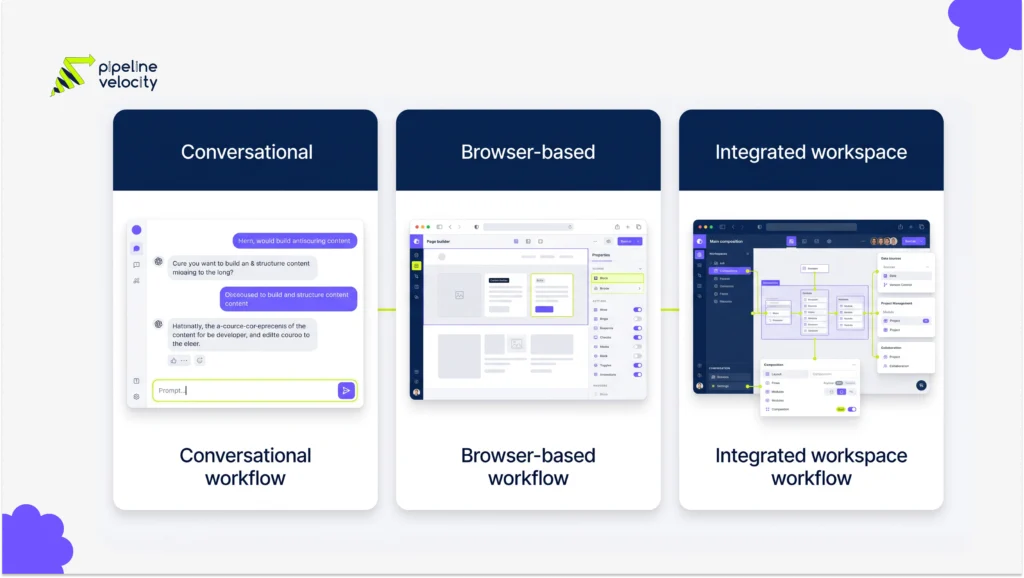
For this shortlist, start with Lovable for a conversational web-app workflow, Bolt for browser-based building, and Replit Agent for an integrated development environment. These are use-case recommendations based on official documentation, not results from a controlled product benchmark. Compare the complete handoff before choosing a platform.
Key Takeaways
- Shortlist a builder by the work your team must perform after the first generation, including editing, testing, and maintenance.
- Lovable, Bolt, and Replit Agent provide different building environments; none removes your responsibility to verify the finished website.
- Test a service page, an interactive feature, and a failed submission using the same brief across shortlisted tools.
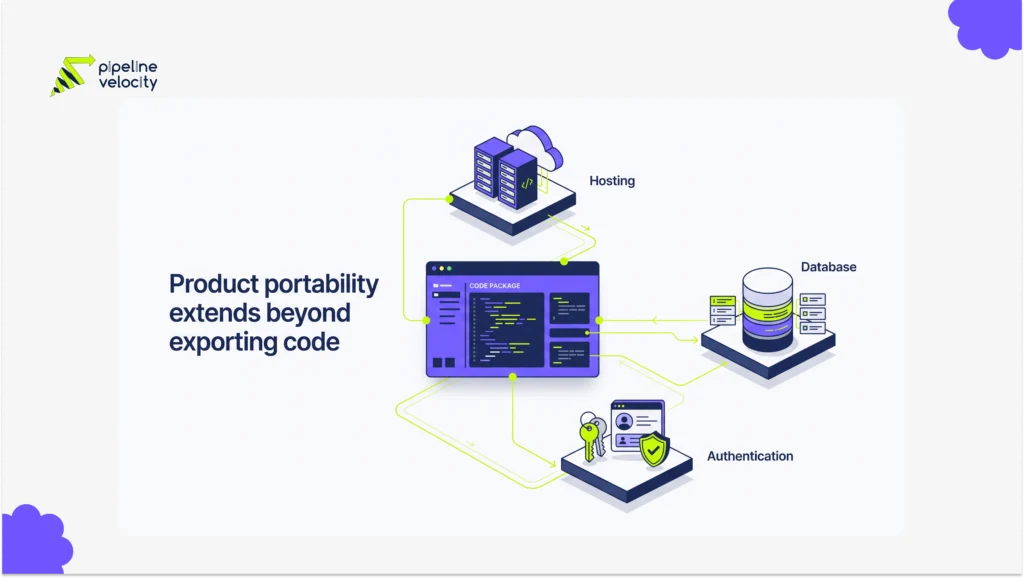
- Separate code access from the ability to move databases, authentication, hosting, and integrations.
- Compare total operating costs and review effort rather than judging value by a free trial.
How Should You Compare the Best Vibe Coding Tools?
Compare the complete delivery workflow, from the brief to the second person maintaining the project. The first screen is only one part of that assessment.
Start by naming the site’s purpose. A campaign page, an interactive estimator, and a customer portal require different functionality. Then identify who will edit content, review code, manage credentials, and investigate failures. A tool that suits an experienced developer may create unnecessary work for a marketing team without technical support.
This shortlist prioritizes tools whose official documentation describes prompt-led building and a route to operating web applications. The suggested fit is editorial judgment. It is not a claim that one tool produces more accurate code, better SEO, or higher conversions than another.
Use a pass/fail requirement for essential capabilities. If your team cannot complete a required integration or maintain the output, a better-looking demonstration should not compensate for that gap.
Which Tools Belong on Your Shortlist?
Choose a starting point according to your team’s working environment. The table identifies the first option to investigate, not a universal ranking.
| Tool | Suggested Starting Use | Ask the Trial to Prove |
| Lovable | A business team describing a web application and refining it conversationally | The generated project can be reviewed, edited, and handed to the person maintaining it. |
| Bolt | A team that wants to build and inspect an application in the browser | The required stack and integrations work, including error states and recovery. |
| Replit Agent | A team that wants AI generation within a broader development workspace | The application can be run, tested, deployed, and supported using the team’s required workflow. |
Treat a mandatory requirement as a reason to eliminate a tool, even if the rest of the demonstration is strong. For example, a website that must fit an existing development process should be evaluated inside that process before a platform decision is made. Record unanswered questions as unresolved, rather than assuming a paid plan will solve them.
Lovable: For a Conversational Web-App Workflow
Lovable is a candidate when describing and refining an application in natural language matches how your team wants to work. Its official documentation describes generating frontend and backend functionality, editable code, and repository synchronization as part of the platform.
Use the Lovable platform overview to establish its documented scope, then test a project that resembles your own requirement. An illustrative B2B trial could combine a service-selection page with an estimator using invented data.
Ask the person who will maintain the site to change the estimator’s rules and inspect the resulting changes. Also test a content edit without rebuilding the page. These checks reveal whether the workflow suits your operating team.
The decision should remain conditional on review of the generated application. A platform’s documented security capabilities do not establish that your particular permissions, data flows, and integration settings are correct. Verify those separately before using customer information.
Bolt: For Browser-Based Building
Bolt is worth evaluating when you want a browser-based path from a prompt to an application. The relevant question is whether that environment supports your required build and maintenance process.
The official introduction to Bolt describes the product’s building workflow. Use it to check the current setup before testing your own service page or interactive feature. Avoid assuming that an example in a promotional video covers your preferred framework, connected services, or hosting requirements.
For a useful trial, ask for a feature, inspect the output, and then change one business rule. Check whether the change preserves the existing behavior. Have a technical reviewer investigate a deliberate failed request and identify what evidence is available.
A browser-based environment may suit collaboration around a prototype. Whether it is the right long-term choice depends on the work that follows: review, deployment, troubleshooting, content maintenance, and eventual transfer to another owner.
Replit Agent: For an Integrated Development Workspace
Replit Agent is a candidate for teams that want AI-assisted building within a development workspace. Its documentation describes building applications from instructions and iterating on the result within Replit.
Review the current Replit Agent workflow, then test the route from a working preview to the version your business intends to operate. Do not treat preview success as proof that a production deployment has the correct configuration.
A practical trial is to build a small service-request application with synthetic records. Ask a reviewer to locate the implementation, run relevant checks, change a requirement, and identify the deployment dependencies. Then remove an integration credential in the test environment and examine the failure behavior.
This choice should depend on the team’s comfort with the whole workspace. Establish who owns the project, who can publish changes, and who will monitor usage and failed requests after launch. An integrated environment still needs an accountable operator.
What Should Your Trial Actually Test?
Run the same business task through each shortlisted option. Different prompts and different levels of help produce a misleading comparison.
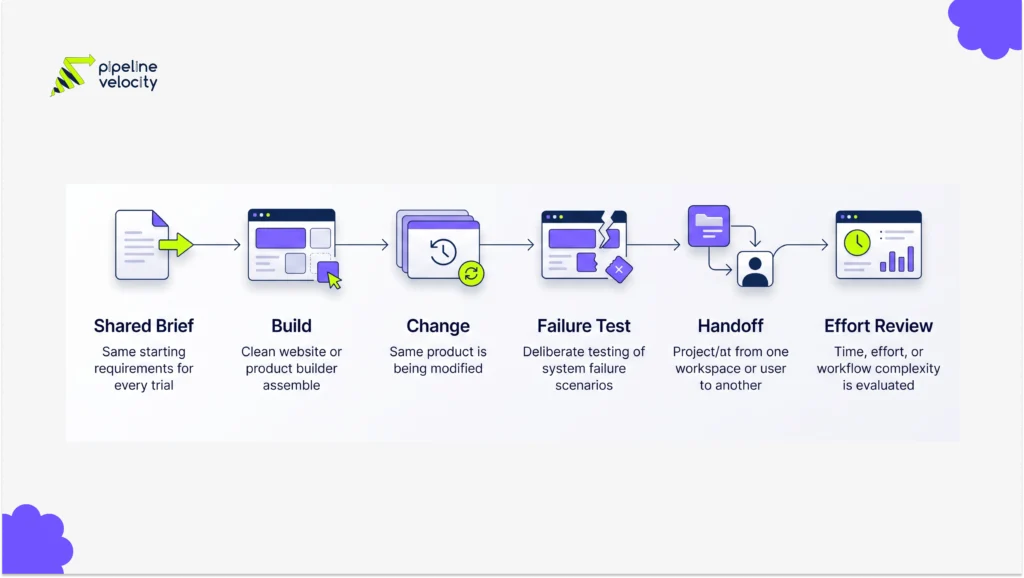
Use this suggested trial sequence:
1. Supply the same approved copy, page structure, brand assets, and fictional data.
2. Build a service page and one interactive feature with explicit expected results.
3. Change a business rule and check whether unrelated behavior remains intact.
4. Test mobile layouts, keyboard use, invalid inputs, and a failed integration.
5. Ask a second person to make a small change using the available documentation.
6. Record generation effort, correction effort, reviewer time, and unresolved blockers.
For an enquiry flow, define the required destination fields before the trial. Your CRM integration requirements should determine whether the form works, rather than the presence of a success message. A tool passes only when the expected record reaches the intended system and failures can be investigated.
What Should You Check About Cost and Portability?
Compare the cost of operating the accepted result, including builder usage, hosting, connected services, review, and maintenance. Subscription price alone is an incomplete comparison.
Ask each vendor or delivery partner which costs increase with usage. Check the current plan before assuming custom domains, collaboration, integrations, or a particular deployment option are included. This article does not quote prices because an accurate estimate requires the actual plan and workload.
Portability needs a separate review. Being able to access source code does not prove that a database, authentication service, or proprietary integration can be moved without work. Ask for an inventory of dependencies and an explanation of how the application would run elsewhere.
Put ownership and exit requirements in the brief. The business should know what it receives, which accounts it controls, and what continued operation would require if the original builder or delivery team is no longer involved.
When Should You Bring in a Development Partner?
Bring in a reviewer before the prototype becomes a business dependency. That point arrives when it handles live enquiries, sensitive records, payments, or an important customer journey.
A delivery partner should be able to assess the implementation, explain the remaining work, and distinguish a useful prototype from a supportable release. Ask for evidence of testing and a maintenance plan rather than a promise that AI has made the project simple.
Pipeline Velocity provides website design and development for businesses connecting website delivery with growth. If you are comparing a prompt-built approach with a managed build, discuss the same scope and acceptance criteria with both providers.
Keep the commercial discussion specific: what will be delivered, who will own it, what must pass before launch, and who is responsible afterward. That gives you a meaningful comparison even when the underlying tools differ.
FAQs
Which Vibe Coding Tool Is Best for Beginners?
The best starting tool is the one in which you can complete and maintain your actual task with the support available. Try a small, isolated project before committing. A simple interface may reduce the effort of starting, but it does not prove that you can troubleshoot the result or operate it safely.
Can These Tools Build a Complete Website?
They can be used to build websites and web applications, but completeness depends on your requirements and the generated implementation. Test content management, navigation, accessibility, integrations, and deployment separately. A successful preview should be treated as one piece of evidence, not the final acceptance decision for a business website.
Are Free Plans Enough for a Business Project?
A free plan may be enough to explore a concept, but a business deployment needs a plan-specific review. Check usage allowances, domains, connected services, collaboration, and support before relying on it. Do not assume that the conditions of a trial will remain suitable as the site acquires traffic or more editors.
Can You Move the Website to Another Platform?
You need to verify code access and every operating dependency before assuming the website can move. Ask how data, authentication, storage, and integrations would be transferred. A code export may be useful, but migration can still require technical work, new services, configuration changes, and testing before the replacement is operational.
Do Vibe Coding Tools Automatically Produce Good SEO?
No builder should be accepted on the assumption that SEO is automatic. Check the rendered pages, metadata, internal links, indexability, performance, and content quality. The relevant evidence comes from the finished website and its intended search audience. A generated layout or an SEO setting does not demonstrate search performance.
Should You Choose a Tool Before Hiring a Developer?
If the project has important integrations or long-term maintenance needs, involve the intended developer before selecting the tool. They can identify restrictions that are difficult to see in a demonstration. For a disposable concept, choosing a tool first is less consequential, provided you are willing to replace the prototype.
Conclusion
Choose two candidates that fit your working environment and give them the same acceptance brief. Keep the record of corrections and unresolved requirements alongside the finished previews.
Before paying for a production build, ask the person maintaining the website to demonstrate a change, a failed request, and a recovery. If those checks expose uncertainty, resolve it during a scoped technical review. That is the point at which a shortlist becomes a defensible purchasing decision.