Why Retrofit Existing Content for AI Search?
Most organizations have a content library that reflects a pre-AI search world:
- Articles written primarily for Google’s traditional ranking signals
- Older posts that still get traffic but feel dated
- Service pages built for humans, not for AI assistants, rephrasing and summarizing them
At the same time, your audience is increasingly asking:
- “ChatGPT, explain [topic] and give me next steps.”
- “Which tools or agencies can help with [problem]?”
- “Summarize the best practices for [topic] in 2026.”
Very often, they stay inside the AI interface from question to decision.
That raises two practical questions:
- When AI tools look for answers in your space, do they see your content as a reliable, usable source?
- Are your existing pages structured so that LLMs can understand, summarize, and cite them correctly?
You do not need to rebuild your website from scratch. You can retrofit existing content so it works better for:
- AI search experiences (e.g., AI overviews, AI-enhanced SERPs)
- LLMs like ChatGPT, Gemini, Claude, and others
- Humans who now expect more precise, faster answers
This guide gives you an FAQ + HowTo template you can plug directly into your content operations: audit, update, and continuously improve existing pages for AI search.
What Does “Optimized for AI Search” Actually Mean?
“Optimized for AI search” does not mean stuffing “ChatGPT” or “Gemini” into your headings.
In practical terms, an AI-optimized page is:
- Easy to interpret
The main topic, audience, and intent are obvious within the first few lines. - Easy to segment
Headings, paragraphs, and lists are clearly structured so that models can identify which part answers which question. - Easy to quote
Key definitions, explanations, and steps are written in short, self-contained blocks that can be reused in answers. - Easy to trust
The page demonstrates expertise, uses real examples, and is part of a broader, coherent topic cluster. - Technically sound
The content is accessible in HTML, loads reasonably fast, and is enriched with a sensible schema.
If you keep those five qualities in mind, optimizing existing content for AI search becomes much more concrete. The rest of this guide focuses on turning them into a repeatable process.
Before You Start: What to Audit on Existing Pages
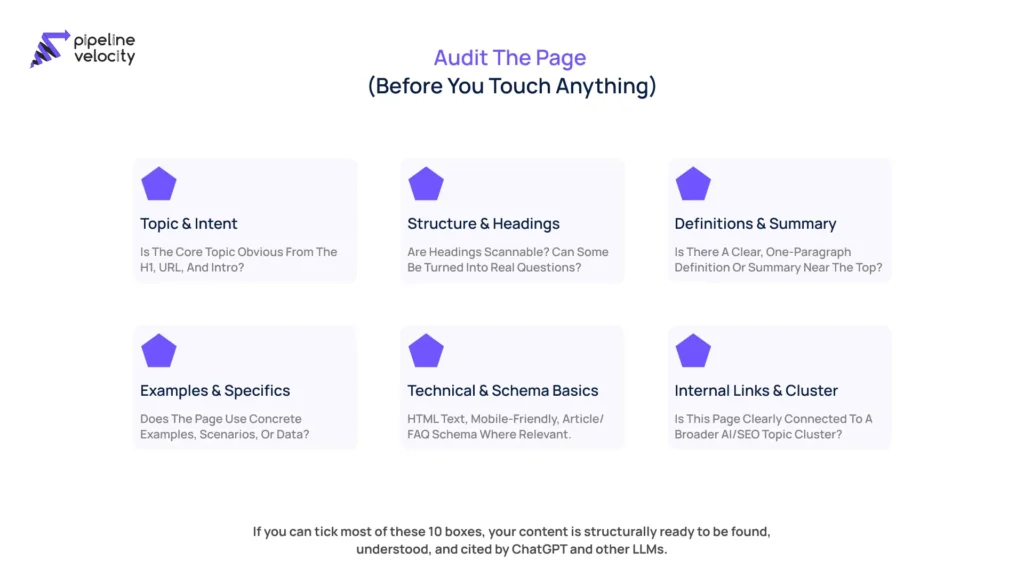
Before editing, take a structured snapshot of where a page stands today. For each existing URL, quickly assess:
- Clarity of purpose
- What is the page really about?
- Is that obvious in the title, URL, and introduction?
- What is the page really about?
- Structure and headings
- Do headings look like questions a real user might ask?
- Are there long unbroken sections that could be split?
- Do headings look like questions a real user might ask?
- Definitions and summaries
- Does the page define its main concept(s) in one short, clear paragraph?
- Is there a succinct summary near the top?
- Does the page define its main concept(s) in one short, clear paragraph?
- Examples and specificity
- Are there concrete examples, use cases, or scenarios?
- Or is it mostly high-level and generic?
- Are there concrete examples, use cases, or scenarios?
- Technical and schema basics
- Is the content in standard HTML tags?
- Does the page use Article/FAQ schema where relevant?
- Is it reasonably fast and mobile-friendly?
- Is the content in standard HTML tags?
- Internal links and topical context
- Does the page link to related content in the same theme?
- Is it clearly part of a topic cluster (e.g., LLMO, GEO, AI search, ChatGPT optimization)?
- Does the page link to related content in the same theme?
This quick audit gives you a baseline and highlights “high-impact” changes you can prioritize.
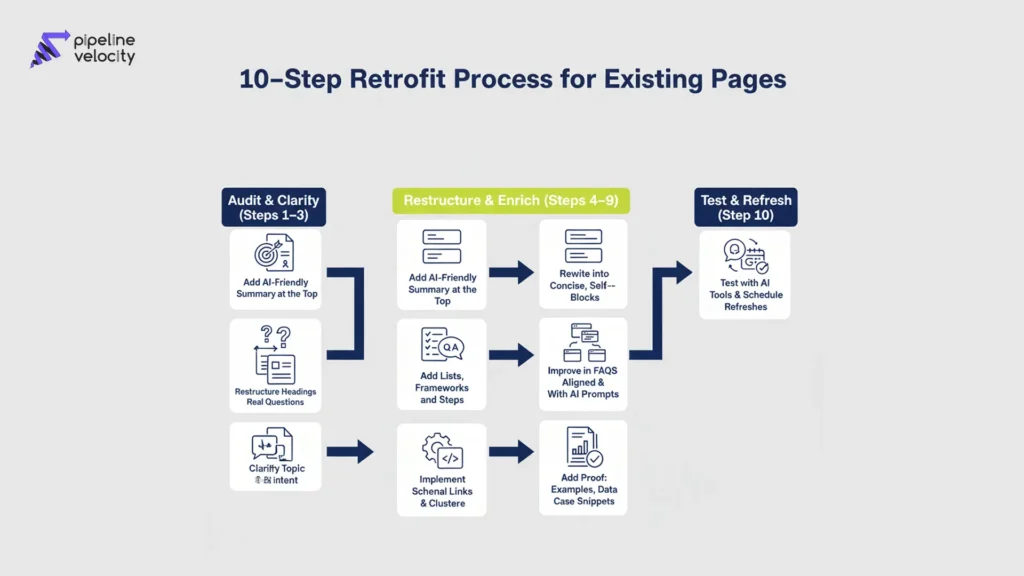
How-To: Step-by-Step Process to Optimize Existing Pages
Step 1: Clarify the Page’s Core Topic and Intent
Start by deciding what this page should own in the AI era.
Ask:
- What is the one primary topic this page should be known for?
- Is the user intent mostly informational (learn), commercial (compare), or transactional (take action, contact, buy)?
- If a user asked an AI assistant to “explain X”, what is “X” for this page?
Update or tighten:
- H1 to reflect the core topic and intent
- URL (if possible) to align with that topic
- Any obviously misleading or overly broad wording
This step reduces ambiguity for both humans and LLMs.
Step 2: Add a Clear, AI-Friendly Summary at the Top
Immediately after your H1, add a short summary block that answers:
- What this page is about
- Who it is for
- What the reader will get from it
Example pattern:
[Concept] is a [short definition]. This page explains [what you cover], who it is for, and how to [outcome or use case]. You will find [bulleted list of main sections or outcomes].
Keep it:
- Direct, not salesy
- Jargon-light
- Specific to this page (not a generic introduction reused everywhere)
This top block becomes a high-value passage for AI tools summarizing your content.
Step 3: Restructure Headings Around Real Questions
Go through your H2s and H3s and ask:
“Could this be a question my audience types into ChatGPT or Gemini?”
If not, consider rewriting them into question-like headings. For example:
- “Background” → “Why is AI search changing how people find content?”
- “Benefits” → “What are the benefits of optimizing existing content for AI search?”
- “Implementation” → “How do you retrofit an existing page for AI and LLMs?”
You don’t need every heading to be a question, but having several question-based headings per page makes it easier for:
- Users to scan and find what they care about
- Models to map questions to the right answer passages
Step 4: Rewrite Sections into Concise, Self-Contained Blocks
Now look inside each section.
Your goal: ensure each paragraph or small group of paragraphs can stand alone as an answer or explanation.
Practical tips:
- Break long paragraphs into two or three shorter ones.
- Keep one main idea per paragraph.
- Use transitional sentences sparingly; prioritize clarity.
Ask for each chunk:
“If an AI assistant lifted only these 3–5 lines, would the reader still get a complete, correct idea?”
If not, tighten or split.
Step 5: Add Lists, Frameworks, and Step-by-Step Instructions
AI search thrives on structure. Review your content for opportunities to turn prose into:
- Numbered lists (steps, processes, sequences)
- Bulleted lists (criteria, benefits, risks, examples)
- Named frameworks (sets of pillars, dimensions, or phases)
For example, instead of saying:
“To optimize existing content for AI search, you should focus on structure, clarity, technical health, and authority.”
Turn it into:
To optimize existing content for AI search, focus on four areas:
- Structure – clear headings, short paragraphs, and logical layout
- Clarity – straightforward language, defined terms, and focused topics
- Technical health – performance, mobile experience, and structured data
- Authority – examples, case references, and author credibility
These structures are easier for AI to extract and present back to users.
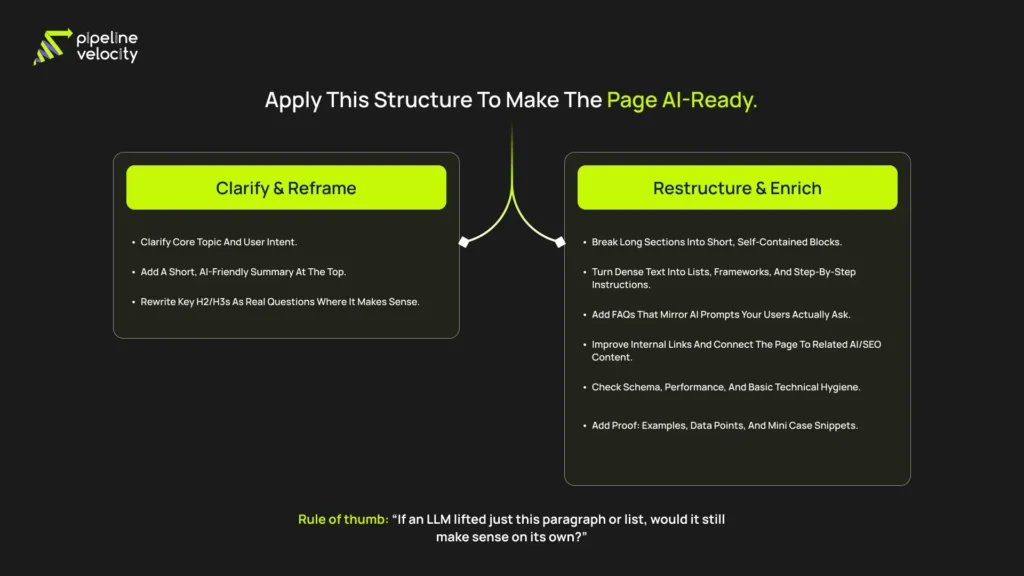
Step 6: Layer in FAQs Aligned With AI Prompts
Add a dedicated FAQ section near the end of the page.
Use questions that sound like real prompts:
- “Do I need to rewrite all my content for AI search?”
- “How often should I refresh existing pages for AI visibility?”
- “Can small sites benefit from optimizing older content for AI?”
For each:
- Start with a direct answer in 2–4 sentences
- Then add detail and nuance in a second paragraph if needed.
This FAQ section can also be marked up with the FAQPage schema, providing search engines and AI systems with additional structured Q&A pairs.
Step 7: Improve Internal Links and Topical Clusters
Next, review internal linking.
Ask:
- Does this page link to other relevant articles in the same AI/SEO topic cluster (e.g., LLMO, GEO, ChatGPT optimization)?
- Are we using descriptive anchor text that matches how users phrase concepts?
Examples of internal link anchors:
- “Large Language Model Optimization (LLMO) guide”
- “Generative Engine Optimization (GEO) vs SEO comparison”
- “ChatGPT citation checklist for AI-ready content”
Internal links:
- Help users go deeper
- Signal topical relationships to search engines.
- Give AI systems a better sense of your site’s structure and expertise.
Step 8: Implement Schema and Technical Hygiene
For each optimized page, check the technical essentials:
- Performance
- Page loads reasonably quickly on mobile and desktop.
- No major layout shifts or blocking pop-ups.
- Page loads reasonably quickly on mobile and desktop.
- Accessibility of main content
- Text is in standard HTML (not image-only or locked in PDFs).
- Headings use <h1>–<h3> correctly.
- Text is in standard HTML (not image-only or locked in PDFs).
- Schema
- Apply Article schema for long-form guides.
- Add FAQPage schema if you include FAQs.
- Ensure your Organization / LocalBusiness / Service schema is implemented sitewide if relevant.
- Apply Article schema for long-form guides.
Technical hygiene does not need to be perfect, but removing major issues makes AI retrieval and interpretation far more reliable.
Step 9: Add Proof: Examples, Data, and Case Snippets
AI-optimized content is still human content.
Go back through the page and ask:
- Where can we replace a vague statement with a concrete example?
- Can we add a short client story or “before/after” scenario?
- Is there a simple metric or range we can share to make this more tangible?
Example transformation:
- Vague: “Updating old content can improve visibility.”
- Specific and human:
“For many sites, updating a handful of high-traffic, outdated articles has more impact than publishing dozens of new posts. We often start by refreshing 5–10 URLs that already rank on page two or three, and then monitor how their impressions and clicks change over the next 60–90 days.”
Flow diagram showing a 10-step process to retrofit existing pages for AI search, grouped into audit, restructure/enrich, and test/refresh phases.
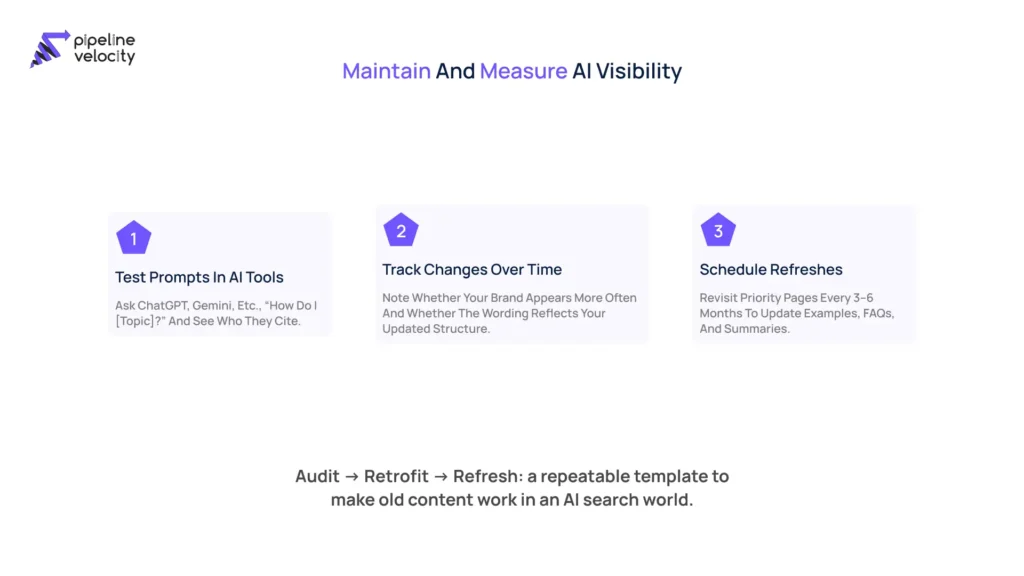
Step 10: Test with AI Tools and Schedule Refreshes
Finally, bring AI search into your measurement routine.
- Define a small set of prompts per page or per topic cluster.
- “Explain [topic] and show me a step-by-step approach.”
- “How do I optimize existing pages for AI search?”
- “Give me a checklist to retrofit old content for ChatGPT.”
- “Explain [topic] and show me a step-by-step approach.”
- Run these prompts in tools your audience is likely to use (e.g., ChatGPT with browsing, Gemini, other AI search tools).
- Record what you see
- Are you cited or linked?
- Are your frameworks or language reflected in the answer?
- Which competitors or sites are commonly referenced?
- Are you cited or linked?
- Plan refreshes
- For important pages, schedule a review every 3–6 months.
- Refresh definitions, examples, screenshots, and FAQ questions as AI answers evolve.
- For important pages, schedule a review every 3–6 months.
Over time, this turns AI search optimization from a one-off project into an ongoing habit.
FAQ: Optimizing Existing Content for AI and LLM Search
Q1. Is optimizing existing content for AI search different from traditional content refreshes?
Yes and no. The underlying principles are similar: clarify your message, improve structure, and update outdated information. The difference is the degree of attention to how answers are segmented and reused. You are deliberately shaping content so that AI tools can lift and recombine your explanations, checklists, and FAQs.
Q2. Do I need technical skills to optimize existing pages for AI search?
You do not have to be a developer. Most of the work is editorial: tightening definitions, restructuring headings, adding FAQs, and improving examples. For schema, performance, and deeper technical work, collaborating with your SEO or development team is helpful.
Q3. Should I create separate pages “just for AI”?
In most cases, no. It is more efficient to make your existing, user-facing pages AI-friendly rather than building separate “AI-only” pages. The goal is to serve humans and machines with the same, well-structured content.
Q4. What if my niche is very specialized? Will AI still find my pages?
In specialized niches, you may have an advantage. If you are one of the few publishing detailed, structured, and well-explained content, AI tools are more likely to rely on you when answering niche questions. The key is to be explicit, concrete, and consistent in how you cover your topics.
Q5. How long does it take to see results after optimizing existing content?
Timelines vary, but a reasonable expectation is several weeks to a few months. It takes time for search engines and AI systems to re-crawl and re-interpret your content. Meanwhile, your human readers benefit immediately from a more transparent structure and more useful explanations.
Putting It All Together: A Simple Implementation Plan
To turn this into action without overwhelming your team, you can work in focused batches:
- Select 5–10 existing pages
- High-traffic guides
- Key service or product pages
- Content closely tied to your core offers and AI/SEO themes.
- High-traffic guides
- Audit each page with the pre-work checklist.
- Topic clarity, structure, definitions, examples, and technical basics
- Topic clarity, structure, definitions, examples, and technical basics
- Apply the 10-step process.
- Clarify, summarize, restructure, add lists and FAQs, improve internal links,and tighten technical and proof elements.
- Clarify, summarize, restructure, add lists and FAQs, improve internal links,and tighten technical and proof elements.
- Use the templates
- Apply the AI-ready outline where the structure is weak.
- Add the FAQ block at the bottom.
- Use refresh notes to brief writers and stakeholders.
- Apply the AI-ready outline where the structure is weak.
- Monitor and iterate
- Track organic performance and engagement.
- Periodically test prompts in AI tools and note whether your content is reflected or cited.
- Schedule refresh cycles so pages continue to evolve with AI search behaviour.
- Track organic performance and engagement.
Optimizing existing content for AI search is not a one-time campaign; it is a new way of thinking about page quality. The more your pages feel clear, structured, and trustworthy to real people, the easier it becomes for AI systems like ChatGPT and Gemini to bring your voice into the answers that shape decisions.