Buying another tool is easy.
Getting marketing, sales, and customer success to run on the same system, with clean data, reliable attribution, and a dashboard that actually predicts pipeline, that is the hard part.
Revenue Operations (RevOps) is designed to close the gap among teams, tools, and data, so growth no longer depends on manual work and gut feel. Pipeline Velocity describes RevOps as the operating system that connects your tools, your teams, and your data to drive predictable growth.
This guide gives you a practical stack blueprint, plus a buyer’s framework to evaluate revenue operations tools across CRM, automation, BI, and attribution, without building a Frankenstein tech stack.
What Revenue Operations Tools Really Mean
Revenue operations tools are not a single product category. They are the set of systems that help you run the full revenue lifecycle, from first touch to closed won to renewal, with shared workflows and shared visibility.
A good RevOps stack does four jobs consistently:
- Captures the truth (system of record)
- Moves work forward (automation and orchestration)
- Keeps data reliable (integrations and governance)
- Makes performance visible (BI, attribution, forecasting)
Pipeline Velocity’s stance is blunt and useful: if your team is still doing key work manually, you are already behind, because your competitors are automating follow-ups, routing, and reporting.
The RevOps Stack Blueprint
Instead of thinking “Which tools should we buy?” think in layers. You are building an operating system, not a shopping cart.
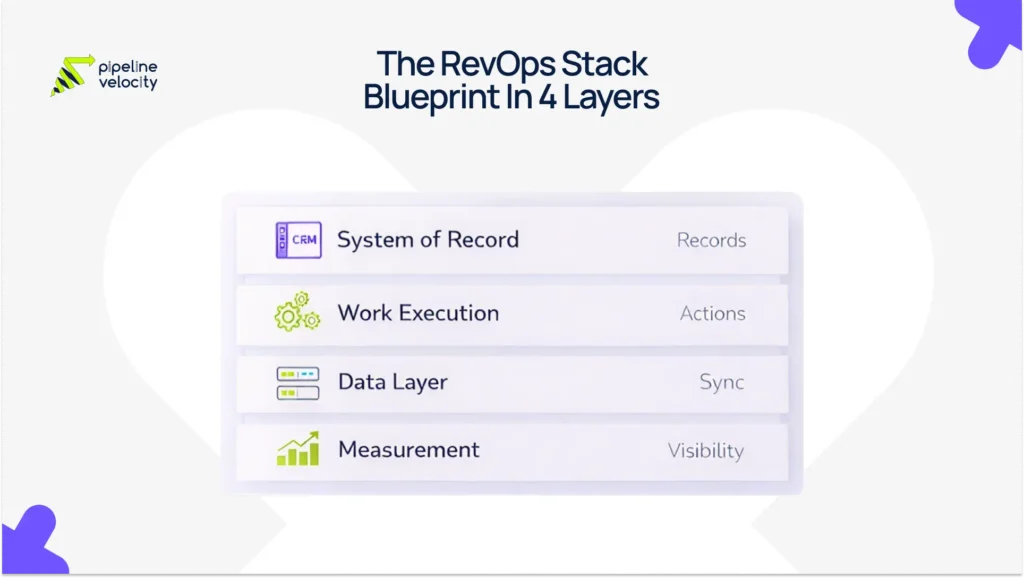
The Four Layers Of A Practical RevOps Stack
- System Of Record
Your CRM is where lifecycle stages, pipeline, and customer records live. - Work Execution Layer
Automation that routes leads, triggers follow-ups, enforces SLAs, and maintains pipeline hygiene. - Data And Integration Layer
Syncs tools, resolves identity, enriches records, and prevents reporting from breaking. - Measurement Layer
Dashboards, attribution, forecasting, and revenue intelligence, built on consistent definitions.
Stack Blueprint Table
| Layer | Tool Category | What It Does | KPIs It Should Improve |
| System Of Record | CRM | Accounts, contacts, lifecycle, pipeline, activity | Stage conversion, cycle length, forecast hygiene |
| Work Execution | Automation And Orchestration | Routing, SLAs, sequences, workflows | Speed to lead, SLA compliance, meeting rate |
| Data Layer | Integrations, Enrichment, Data Quality | Sync, dedupe, enrichment, governance | Reporting accuracy, attribution reliability |
| Measurement | BI, Attribution, Forecasting | Dashboards, pipeline insights, ROI | Pipeline velocity, coverage, CAC payback, NRR |
If your CRM is messy, you will feel it everywhere: broken attribution, unreliable dashboards, and forecasts that turn into opinions. Pipeline Velocity’s CRM management service focuses on clean data, workflow automation, and visibility that teams can actually trust.
Tool Categories That Matter Most (And What To Buy First)
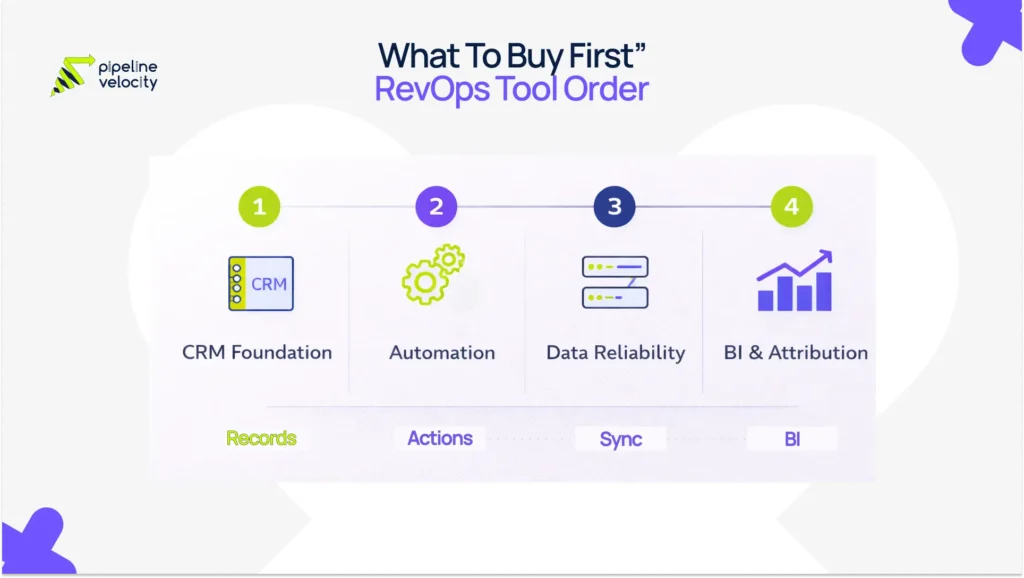
Most teams buy in the wrong order. They chase attribution or fancy forecasting before they have reliable lifecycle data.
A safer order is:
CRM foundation first, then automation, then data reliability, then BI and attribution depth.
CRM
Your CRM is not a database. It is a workflow engine.
What to evaluate:
- Can you standardize lifecycle stages and required fields without heavy customization?
- Does it support the handoffs you need (marketing to sales, sales to customer success)?
- Can reporting be trusted without exporting to spreadsheets every week?
Pipeline Velocity positions CRM as the sales engine, not a “spreadsheet replacement,” and emphasizes workflow, automation, and clean data as the difference between momentum and a pipeline graveyard.
Automation And Orchestration
Automation is about winning back time and stopping leads from dying quietly.
Common use cases to insist on:
- Lead routing by ICP, territory, and intent
- SLA alerts when follow-up slips
- Automated task creation and sequencing
- Pipeline hygiene rules (stale deal alerts, next-step enforcement)
Revenue orchestration platforms are increasingly positioned as the “action layer” that unifies fragmented GTM workflows, not just records what happened.
Data, Integrations, And Enrichment
This is the layer buyers underestimate, then regret.
What to evaluate:
- Reliability of integrations (and what breaks during tool updates)
- Deduplication and identity resolution capabilities
- Data governance controls (who can change fields, stages, routing rules)
- Monitoring and alerting when sync fails
RevOps stack guidance consistently highlights that tool sprawl and siloed systems force manual reconciliation, which kills cross-functional visibility.
BI And Revenue Analytics
BI should answer two questions:
- What is happening right now?
- What should we do next week?
RevOps reporting best practices increasingly emphasize dashboard architecture by audience, exec, leadership, operators, plus a cadence that turns metrics into actions.
If you want a Pipeline Velocity-aligned internal link for the KPI conversation, their pipeline velocity guide is a solid supporting read.
Attribution
Attribution is only as good as your lifecycle timestamps and campaign hygiene.
What to evaluate:
- Can you consistently track first touch, lead source, and campaign influence?
- Can marketing and sales agree on definitions like pipeline created vs influenced?
- Can you audit and explain a “why” behind channel performance?
Pipeline Velocity calls out “real attribution” and “pipeline forecasting” as core visibility problems they solve, which matches what most teams actually want when they say “we need better attribution.”
Revenue Intelligence And Forecasting
Revenue intelligence tools often help you detect deal risk early: activity gaps, stage stagnation, and changes in buyer engagement.
What to evaluate:
- Does it improve forecast accuracy, or just create more dashboards?
- Can it pull cleanly from your CRM and activity sources?
- Can your team operationalize the signals in weekly pipeline reviews?
Revenue intelligence is commonly described as turning revenue data into actionable insights across sales and marketing decisions.
A Buyer’s Guide: How To Evaluate Revenue Operations Tools
Here is the simplest rule: buy tools to fix workflows, not to impress leadership.
Step 1: Start With Use Cases And KPIs
Pick 3 to 5 outcomes you want tools to improve in the next 90 days:
- Speed to lead and SLA compliance
- Lead to opportunity conversion
- Pipeline velocity and stage aging
- Forecast accuracy and slippage
- Renewal and expansion visibility
This aligns with modern RevOps reporting guidance: a smaller set of KPIs, reviewed on a cadence, creates action, not noise.
Step 2: Decide “All-In-One” vs Best-Of-Breed
All-in-one can work when:
- You are early stage, and need a shared system fast
- You have limited admin capacity
- Your biggest problem is disconnected teams and an inconsistent process
Best-of-breed can work when:
- You have multiple motions, segments, or regions
- You need deeper forecasting, attribution, or analytics than a suite provides
- You can support integrations and governance
The tradeoff is real: more tools often means more integration risk and more maintenance.
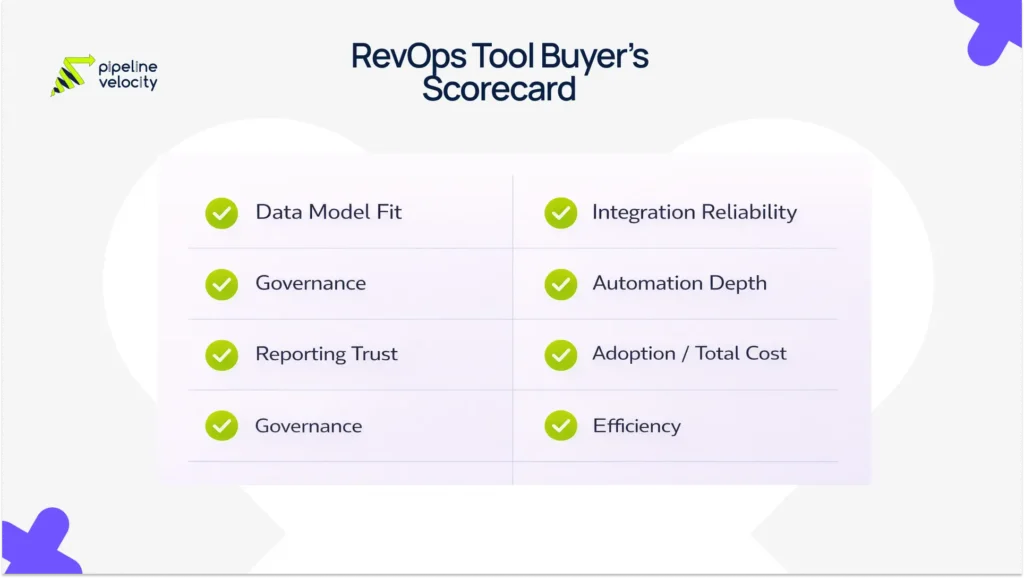
Step 3: Score Tools On The Things That Break Later
Use a simple scorecard:
| Criteria | What To Look For |
| Data Model Fit | Lifecycle stages, objects, required fields |
| Integration Reliability | Bi-directional sync, error handling, and monitoring |
| Governance | Permissions, change control, audit history |
| Automation Depth | Routing, SLAs, workflow flexibility |
| Reporting Trust | Can you define KPIs once and reuse them everywhere? |
| Adoption | UI simplicity, training burden, in-product guidance |
| Total Cost | Licenses plus admin time plus integration costs |
This is where many RevOps strategies fail if they lack an operating model, governance, decision rights, and a way to sustain execution beyond the initial setup.
Step 4: Run A Short Proof, Not A Long Pilot
A good proof answers:
- Can we route and follow up faster next week?
- Can we produce one dashboard we trust, without manual workarounds?
- Can we clearly explain attribution for one channel?
If you cannot, the tool is not solving the problem, or your foundation is not ready.
Stack Blueprint By Stage (Startup → Scale)
Startup Stack (Simple Motion, Limited Admin)
Must have:
- CRM with lifecycle stages and clean pipeline hygiene
- Basic automation for routing and follow-up
- Simple dashboards for funnel and pipeline
Nice to have:
- Enrichment for cleaner contact and account data
Avoid for now:
- Complex attribution platforms if your tracking hygiene is not solid
Growth Stack (More Channels, More Volume)
Must have:
- Strong routing, SLAs, and workflow automation
- Integration layer that does not break weekly
- KPI dashboards by audience (exec and operators)
Nice to have:
- Multi-touch attribution, if lifecycle timestamps are reliable
Scale Stack (Multiple Motions, Forecast Pressure)
Must have:
- Forecasting discipline and revenue intelligence signals
- Segment-level reporting and BI maturity
- Governance, change control, and data monitoring
Nice to have:
- Deeper orchestration and advanced automation, when teams are ready to adopt it
The KPI Layer: What Your Stack Must Measure
A RevOps stack is only valuable if it can measure the levers that move revenue.
Start with:
- Speed to lead, and SLA compliance
- Stage conversion rates
- Stage aging and stale deal rate
- Pipeline coverage and pipeline velocity
- Forecast slippage
Pipeline velocity is especially useful because it ties together the levers you can actually change: opportunity volume, deal value, win rate, and sales cycle length.
Implementation Checklist (90-Day Rollout Plan)
Days 1 To 30: Foundation
- Lock lifecycle and pipeline definitions
- Clean CRM fields, required fields, and dedupe rules
- Establish KPI definitions and a basic dashboard
Days 31 To 60: Automation And Reliability
- Implement routing, SLAs, and follow-up workflows
- Stabilize core integrations and sync monitoring
- Add operator dashboards for daily execution
Days 61 To 90: Visibility And Optimization
- Add attribution depth where data supports it
- Implement pipeline hygiene alerts and forecast inspection views
- Run a weekly operating cadence using the dashboard, not opinions
If you want a strong internal reference for aligning the data layer with the action layer, Pipeline Velocity’s CDP vs. marketing automation article clarifies what belongs where in the stack.
When A Revenue Operations Agency Makes More Sense
Tool selection is rarely the real bottleneck.
The bottleneck is implementation, governance, and adoption, plus the cleanup required to make reporting trustworthy.
If your team is stuck in any of these loops, it is usually time to bring in RevOps help:
- CRM hygiene keeps slipping, and dashboards keep getting debated
- Leads are not followed up consistently
- Attribution is unreliable, and no one trusts ROI
- Integrations break, and reporting becomes manual every month
Pipeline Velocity’s Revenue Operations Agency is positioned to align marketing, sales, and customer success, eliminate bottlenecks, and build the systems that make growth predictable.
For CRM cleanup and governance specifically, their CRM management service is a natural next step.
If sales execution and outreach systems are the bigger gap, their sales enablement support is positioned as a sales problem.
FAQs
What Are Revenue Operations Tools?
Revenue operations tools are the systems that help unify sales, marketing, and customer success workflows, typically including CRM, automation, analytics, and supporting data infrastructure.
What Is In A Typical RevOps Tech Stack?
A typical stack includes CRM, marketing automation, sales enablement or engagement tools, customer success tooling, analytics, and often a data warehouse and project management tools.
How Many RevOps Tools Should A Company Have?
Enough to run the workflow end to end, but not so many that integrations and governance become a full-time job. Lean stack guidance consistently warns against tool sprawl and “stack bloat.”
Do I Need An Attribution Tool, Or Is CRM Reporting Enough?
If your lifecycle tracking and campaign hygiene are strong, CRM reporting can go far. If attribution debates are constant, and you need multi-touch clarity, an attribution layer can help, but only after your data foundation is reliable.
What KPIs Should My RevOps Stack Support?
At minimum: speed to lead, SLA compliance, stage conversion, stage aging, pipeline coverage, pipeline velocity, and forecast slippage.
What Is The Biggest Mistake When Buying RevOps Tools?
Buying tools before defining the operating model, lifecycle definitions, governance, and KPI standards. Forrester explicitly highlights the operating model as the bridge between strategy and sustained execution.
Conclusion
Revenue operations tools are only “RevOps tools” when they function as a single system.
If your stack does not route leads reliably, enforce follow-up, keep pipeline clean, and produce dashboards your team trusts, you do not have a RevOps stack. You have software.
Build the foundation first, then automate, then invest in BI and attribution depth once the data is solid. If you need help turning a messy stack into a revenue engine, Pipeline Velocity’s RevOps team focuses on aligning tools, teams, and data to remove bottlenecks and make growth predictable.
Key Takeaways:
- Design your stack in layers: system of record, execution, data, measurement.
- Buy tools to fix workflows tied to KPIs, not to collect features.
- Prioritize CRM hygiene and integration reliability before advanced attribution.
- Use pipeline velocity and forecast health as early warning signals, not just end-of-quarter revenue.