


Introduction
Your content may look clear to your team, but Claude may see something different.
It may summarize the wrong point, miss your target audience, confuse the service you offer, ignore your best evidence, or fail to identify why the page should be trusted. That is not only a Claude problem. It is often a content clarity problem.
As AI search becomes part of the buyer journey, testing content in Claude is becoming a practical SEO habit. It helps you see whether your page is easy for an AI system to understand, explain, and potentially cite. More importantly, it shows where human readers may also be getting lost.
This guide gives you a prompt QA workflow and fix checklist to test content in Claude, diagnose weak sections, and improve your page for both readers and AI search visibility.
What Does It Mean To Test Content In Claude?
Testing content in Claude means using structured prompts to check whether Claude can correctly understand, summarize, classify, and evaluate a page.
In SEO, this is useful because Claude acts like a very demanding reader. If your content is vague, poorly structured, unsupported, or misaligned with search intent, Claude may expose those issues quickly.
Claude testing can help answer questions like:
- Does Claude understand the page’s main topic?
- Does Claude identify the right audience?
- Does Claude understand the search intent?
- Does Claude extract the correct answer from the page?
- Does Claude find the evidence strong enough?
- Does Claude recognize the brand’s service angle?
- Does Claude understand what the reader should do next?
- Does Claude identify missing sections or unclear claims?
This is not the same as asking Claude to “make the blog better.” A proper test has success criteria, repeatable prompts, scoring, and a fix process. Anthropic’s prompt engineering overview recommends defining success criteria and having a way to test against them before improving a prompt or workflow.
For content teams, the same principle applies. Before you rewrite a page, define what Claude should understand from it.
Why Claude Testing Matters For SEO
Claude testing matters because AI visibility depends on clarity, structure, and trust.
Traditional SEO asks whether a page can rank. Claude testing asks whether the page can be understood and used in an answer. Those are related, but they are not identical.
A page may have strong keywords and still fail a Claude test if:
- The main answer is buried.
- The headings are vague.
- The target audience is unclear.
- Claims are not supported.
- The content lacks examples.
- The conclusion does not match the search intent.
- The page has weak internal links.
- The service connection feels forced or missing.
- The page does not include useful FAQs.
Claude’s web search documentation says Claude can use real-time web content and include citations from search results when web search is used. It also explains that Claude decides when to search based on the prompt, then produces a final response with cited sources.
That means content teams should not only ask, “Can this page rank?” They should also ask, “Can Claude understand and trust this page enough to use it?”
Pipeline Velocity’s SEO services already focus on keyword strategy, content clusters, on-page optimization, AI Search Optimization and GEO, technical SEO, link building, schema optimization, and performance tracking. Those same foundations make Claude testing more useful because they connect content clarity to measurable organic growth.
What Claude Can And Cannot Tell You
Claude can help test whether your content is clear, complete, and aligned with intent. It cannot replace SEO tools, analytics, search console data, crawler data, or expert editorial judgment.
Use Claude testing for:
- Content clarity checks.
- Search intent alignment.
- Audience fit.
- Message consistency.
- Section-level summaries.
- FAQ gap discovery.
- Citation readiness checks.
- On-page content QA.
- Content refresh planning.
- Buyer journey alignment.
Do not use Claude testing as the only source for:
- Keyword volume.
- Live rankings.
- Backlink authority.
- Technical crawl errors.
- Core Web Vitals.
- Conversion attribution.
- Indexing status.
- Final factual verification.
Claude is useful for interpretation, but SEO still needs evidence. Pair Claude testing with Google Search Console, analytics, crawl tools, SERP analysis, and manual review.
A good rule is simple. Use Claude to identify possible clarity and structure problems, then validate important decisions with real data.
The Claude Content Understanding Test
The Claude content understanding test is a repeatable workflow for checking whether a page communicates what you intended.
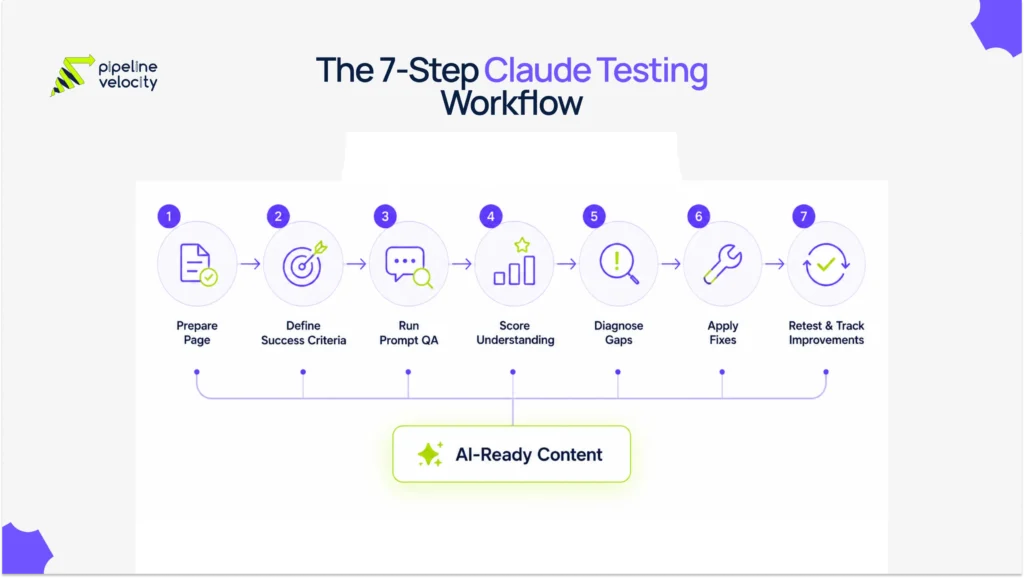
The workflow has five parts:
| Stage | Goal | Output |
| Prepare | Gather the page, keyword, audience, and goal. | Testing brief. |
| Prompt | Ask Claude structured QA questions. | Claude responses. |
| Score | Rate how well Claude understood the page. | Understanding score. |
| Fix | Improve unclear or weak sections. | Content action list. |
| Retest | Run the same prompts again after updates. | Before and after comparison. |
This is important because one prompt is not enough. Claude may answer differently depending on how you ask the question. A reliable test uses several prompts that check the page from different angles.
Anthropic’s evaluation documentation recommends defining success criteria and designing evaluations to measure performance against those criteria. While that guidance is written for LLM applications, the same logic works for content QA.
Step 1: Prepare The Page For Testing
Before you test content in Claude, prepare a short testing brief.
This keeps the test focused. Without a brief, Claude may judge the page based on generic writing quality instead of the actual business goal.
Collect these items:
| Item | What To Include |
| Page URL Or Draft | The live URL, copied page text, or draft content. |
| Primary Keyword | The main keyword, such as “test content in Claude.” |
| Secondary Keyword | Supporting term, such as “Claude testing.” |
| Search Intent | Informational, commercial, transactional, or navigational. |
| Target Audience | Who the content is written for. |
| Page Goal | Rank, educate, convert, refresh, support sales, or earn citations. |
| Service Angle | The relevant service or offer. |
| Competitors | Optional competing URLs or SERP examples. |
| Must-Say Points | Claims, differentiators, examples, or internal links that should appear. |
For this article, the testing brief would look like this:
| Field | Example |
| Primary Keyword | test content in Claude |
| Secondary Keyword | Claude testing |
| Intent | Informational |
| Audience | Marketing leaders, SEO teams, content managers, and B2B founders |
| Page Goal | Teach readers how to run prompt QA and improve AI search readiness |
| Service Angle | Pipeline Velocity’s SEO service |
| Internal Link | SEO Services |
| Related Content | LLM Search Ranking Signals, AEO Vs SEO, Optimize Website For ChatGPT |
The testing brief becomes your control sheet. If Claude misses one of these items, you know where the content may need improvement.
Step 2: Define Success Criteria
Do not test a page until you know what a successful result looks like.
Success criteria turn Claude testing from a casual review into a repeatable QA process. Anthropic’s prompt engineering documentation recommends being clear and direct, specific about the desired output, and using sequential steps when order or completeness matters.
For content testing, success criteria should cover five areas.
| Test Area | Success Criteria |
| Topic Understanding | Claude correctly summarizes the main topic in one or two sentences. |
| Intent Match | Claude identifies the search intent and confirms the page satisfies it. |
| Audience Fit | Claude identifies the intended reader and their problem. |
| Evidence Quality | Claude finds credible proof, examples, sources, or data. |
| Action Clarity | Claude understands what the reader should do after reading. |
A strong success statement could be:
Claude should understand that this article teaches SEO and content teams how to test whether Claude understands a page, using prompt QA, scoring, diagnostics, and a fix checklist. It should identify the audience as marketers, SEO teams, and content managers. It should recognize the intent as informational and the service connection as AI-ready SEO support from Pipeline Velocity.
This gives you something concrete to compare against Claude’s output.
Step 3: Run Prompt QA In Claude
Prompt QA means asking Claude a sequence of structured questions about the page.
Use the same prompts every time you test a page. That makes your results easier to compare across drafts, refreshes, and competitors.
Prompt 1: Main Topic Test
Use this prompt to see whether Claude understands the page’s core idea.
Prompt:
I am testing whether this page is clear. Read the content below and answer these questions:
- What is the main topic of the page?
- What problem does the page solve?
- What is the one-sentence takeaway?
- What keyword or query does this page appear to target?
Here is the page content:
[Paste content]
Pass condition:
Claude should identify the correct topic, problem, takeaway, and target query without inventing a different angle.
Prompt 2: Search Intent Test
Use this prompt to check whether the page satisfies the keyword intent.
Prompt:
Evaluate this page for the keyword “[PRIMARY KEYWORD]” and intent “[INTENT].”
Score the page from 1 to 5 on:
- Intent match.
- Completeness.
- Clarity.
- Practical usefulness.
- Likelihood that a reader would not need to search again.
For each score, explain what is working and what should be improved.
Here is the page content:
[Paste content]
Pass condition:
Claude should confirm the correct intent and identify specific missing sections, not vague advice.
Prompt 3: Audience Understanding Test
Use this prompt to see whether the page clearly signals who it is for.
Prompt:
Based only on the content, who is the intended audience for this page?
Return:
- Primary audience.
- Secondary audience.
- Their main pain points.
- Their likely level of expertise.
- Any audience confusion you notice.
Here is the page content:
[Paste content]
Pass condition:
Claude should identify the intended audience accurately. If it says “general readers” when the page is for B2B SEO teams, the positioning is too broad.
Step 4: Score Claude’s Understanding
After running the prompts, score Claude’s understanding.
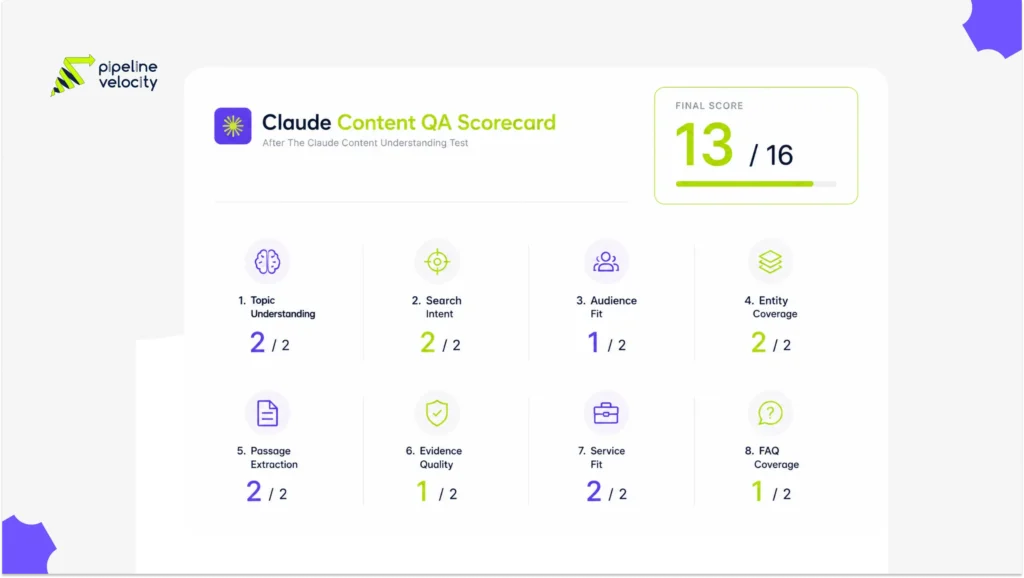
Use a simple 0 to 2 scale for each category. This keeps the QA fast enough for real content workflows.
| Score | Meaning | What It Means |
| 0 | Failed | Claude misunderstood or missed the point. |
| 1 | Partial | Claude understood some parts, but missed important details. |
| 2 | Passed | Claude understood the page accurately and completely. |
Use this scoring table:
| Test Category | Score | What To Check |
| Main Topic | 0 to 2 | Did Claude summarize the page correctly? |
| Search Intent | 0 to 2 | Did Claude identify and validate the intent? |
| Audience | 0 to 2 | Did Claude identify the right reader? |
| Entity Coverage | 0 to 2 | Did Claude identify the central and supporting entities? |
| Passage Extraction | 0 to 2 | Did Claude find strong answer blocks? |
| Evidence Quality | 0 to 2 | Did Claude see enough proof and sources? |
| Service Fit | 0 to 2 | Did Claude understand the natural business connection? |
| FAQ Coverage | 0 to 2 | Did Claude identify useful follow-up questions? |
Maximum score: 16.
| Total Score | Interpretation |
| 13 to 16 | Strong Claude understanding. Minor improvements needed. |
| 9 to 12 | Moderate understanding. Fix structure, evidence, or missing sections. |
| 5 to 8 | Weak understanding. The page needs a serious rewrite or reorganization. |
| 0 to 4 | Failed understanding. Rebuild the page around intent, audience, and structure. |
A low score does not mean Claude is “wrong.” It usually means the page does not communicate clearly enough.
Step 5: Diagnose The Gaps
Claude testing is only useful if you know what to do with the results.
Use this diagnostic table to map Claude’s mistakes to likely content problems.
| Claude Testing Problem | Likely Content Issue | What To Fix |
| Claude summarizes the wrong topic. | The introduction and H1 are unclear. | Rewrite the intro, H1, and first answer block. |
| Claude misses the target audience. | Audience signals are too generic. | Add use cases, examples, and pain points for the right reader. |
| Claude identifies the wrong intent. | The page mixes informational and commercial goals. | Separate education from sales sections. |
| Claude cannot find strong passages. | Sections are too long or unfocused. | Add passage answers under each H2. |
| Claude says evidence is weak. | Claims lack sources, data, or examples. | Add primary sources, current stats, and first-hand context. |
| Claude misses the service angle. | Internal links and CTAs are weak. | Add a natural service section and relevant internal links. |
| Claude suggests many FAQs. | Long-tail coverage is thin. | Add focused FAQs before the conclusion. |
| Claude says the content is repetitive. | Sections overlap or cannibalize each other. | Merge duplicate points and clarify each section’s role. |
| Claude invents missing claims. | The page is ambiguous. | Define terms, clarify claims, and add examples. |
This diagnostic step is where Claude testing becomes valuable for SEO. The output is not just feedback. It is a content refresh roadmap.
Step 6: Use The Fix Checklist
After scoring and diagnosis, improve the page using a structured fix checklist.
Content Clarity Fixes
- Rewrite the first 100 words so the main topic is clear.
- Add the primary keyword naturally in the introduction.
- State the page’s purpose in plain language.
- Make the target audience obvious.
- Remove vague claims.
- Replace generic advice with specific examples.
- Keep each paragraph focused on one idea.
Search Intent Fixes
- Confirm the page answers the informational intent.
- Add a direct answer near the top.
- Include a step-by-step process if the query asks “how.”
- Add definitions for beginner readers.
- Add examples for advanced readers.
- Remove sales-heavy sections that interrupt learning.
- Add a practical checklist near the end.
Structure Fixes
- Use one clear H1.
- Use H2s for major questions.
- Use H3s for supporting points.
- Add a table of contents after the introduction.
- Start each major section with a passage answer.
- Use tables for scoring, comparisons, and checklists.
- Add FAQs before the conclusion.
- End with a conclusion and Key Takeaway / TL DR list.
Evidence Fixes
- Add credible external sources for factual claims.
- Prefer primary sources where available.
- Add dates to statistics.
- Add examples from real content workflows.
- Add expert commentary or practical observations.
- Clarify where a recommendation is a best practice, not a guarantee.
Anthropic’s prompting best practices recommend source verification for research tasks and clear success criteria for successful answers. That makes evidence QA especially important when testing content in Claude.
AI Citation Readiness Fixes
- Make important answers visible in the body content.
- Add short, self-contained answer blocks.
- Use clear definitions.
- Add comparison tables where helpful.
- Add FAQ answers that work without surrounding context.
- Avoid unsupported statements.
- Use descriptive internal links.
- Add Article, FAQPage, BreadcrumbList, and Organization schema where relevant.
Claude’s citation documentation explains that citable text comes from source content, while fields such as title and context are passed to the model but are not used toward cited content in the same way.
For website content, the lesson is simple. Put the real answer in the page body, not only in metadata, images, or hidden design elements.
Step 7: Retest And Track Improvements
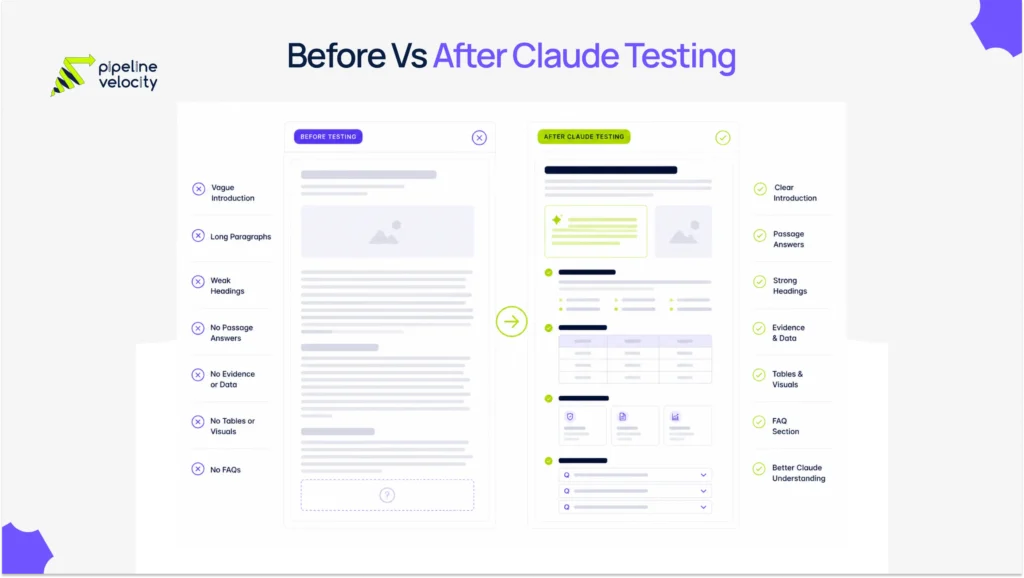
After you fix the page, run the same Claude prompts again.
Do not change the test prompts every time. If you change the prompts, you cannot compare results fairly. Use the same prompt set before and after the content refresh.
Track results in a simple sheet:
| Date | URL | Keyword | Score Before | Fixes Made | Score After | Notes |
| Jan 10 | /example-page | test content in Claude | 9 | Added passage answers, FAQs, sources | 14 | Claude now identifies intent correctly. |
Retest monthly for priority pages.
Claude testing should become part of your content refresh process, especially for pages targeting AI search, GEO, AEO, and citation visibility.
A practical cadence:
- Test new pages before publishing.
- Test high-traffic pages quarterly.
- Test declining pages during refresh cycles.
- Test money pages monthly.
- Test AI-search cluster pages after major model or SERP changes.
The goal is not perfection. The goal is to catch misunderstandings before they cost rankings, citations, or conversions.
How Pipeline Velocity Supports AI-Ready SEO Testing
Claude testing is not just a content exercise. It is part of modern SEO quality control.
A page that Claude misunderstands may also confuse readers, search engines, and AI answer systems. That is why prompt QA should sit inside a larger SEO system that includes technical health, content structure, topical authority, internal linking, schema, and performance reporting.
Pipeline Velocity’s SEO services include keyword strategy and planning, on-page optimization, AI Search Optimization and GEO, competitor analysis, technical SEO, link building and authority, and performance tracking. The service page also highlights content clusters, content tuning, zero-click readiness, AI summary optimization, technical audits, schema optimization, and custom dashboards.
For brands that want to test content in Claude, Pipeline Velocity can support:
- Claude testing workflows.
- AI search visibility audits.
- Prompt QA templates.
- Content refresh prioritization.
- Search intent mapping.
- Passage answer optimization.
- FAQ and schema improvements.
- Internal linking strategy.
- AI citation readiness checks.
- Reporting that connects AI visibility to pipeline.
The goal is not to optimize for Claude alone. The goal is to build content that buyers, search engines, and AI systems can understand and trust.
FAQs
What Does It Mean To Test Content In Claude?
Testing content in Claude means using structured prompts to check whether Claude can correctly understand a page’s topic, audience, intent, evidence, structure, and next step. It helps content teams find clarity issues before publishing or refreshing a page.
How Do I Test Content In Claude?
To test content in Claude, paste the page content into Claude with a clear prompt, ask it to identify the topic, audience, intent, main takeaway, missing sections, and citation-ready passages, then score the results against your success criteria.
Is Claude Testing The Same As An SEO Audit?
No. Claude testing is a content understanding test. An SEO audit also includes technical SEO, rankings, backlinks, indexing, Core Web Vitals, analytics, and crawl data. Claude testing is best used as part of a broader SEO audit.
What Should I Ask Claude When Testing A Blog?
Ask Claude to summarize the blog, identify the target keyword, classify the search intent, name the intended audience, extract the strongest passages, find unsupported claims, suggest FAQs, and recommend fixes.
Can Claude Tell Me If My Content Will Rank?
Claude can give useful feedback on clarity, structure, intent, and completeness, but it cannot guarantee rankings. Use Claude testing with SERP analysis, keyword research, Google Search Console, analytics, and technical SEO tools.
How Often Should I Run Claude Testing?
Run Claude testing before publishing new strategic pages, during content refreshes, and monthly for high-value AI search or SEO pages. For lower-priority blogs, quarterly testing is usually enough.
What Is A Good Claude Testing Score?
Using a 16-point QA score, 13 to 16 is strong, 9 to 12 needs improvement, 5 to 8 is weak, and 0 to 4 means the page likely needs a major rewrite.
Why Does Claude Misunderstand My Content?
Claude may misunderstand content when the page has vague headings, a weak introduction, buried answers, mixed intent, unsupported claims, unclear audience signals, or poor section structure.
Can Claude Testing Help With AI Citations?
Yes. Claude testing can identify whether your content has clear, citation-ready passages. It can also reveal where you need stronger sources, better definitions, clearer tables, or FAQs.
Should I Test Competitor Content In Claude Too?
Yes. Testing competitor content can show why their pages may be easier to understand or cite. Compare their structure, evidence, FAQs, internal links, and passage clarity against your own page.
Conclusion: Key Takeaway / TL DR
Claude testing is one of the fastest ways to see whether your content is actually clear.
If Claude cannot summarize your page, identify the audience, understand the intent, or extract useful passages, your human readers may also struggle. The fix is not to write for AI. The fix is to make the page clearer, more structured, better sourced, and easier to use.
Key Takeaway / TL DR:
- Test content in Claude before publishing or refreshing important pages.
- Start with a clear testing brief, including keyword, intent, audience, and page goal.
- Define success criteria before running prompts.
- Use multiple prompts to test topic, intent, audience, evidence, structure, FAQs, and service fit.
- Score Claude’s understanding with a simple QA system.
- Treat failed answers as clues about unclear content.
- Fix weak pages with better introductions, passage answers, headings, evidence, tables, FAQs, schema, and internal links.
- Retest with the same prompts after updates.
- Track before and after scores over time.
- Use Claude testing as part of a complete SEO system, not as a replacement for data, analytics, or expert review.