


Introduction
Claude does not cite a page because it looks beautiful.
It cites content that is easy to find, easy to understand, and easy to verify. That means formatting is no longer just a design choice. It is part of how your content competes in AI search.
If your page is one long block of text, Claude may struggle to isolate the best answer. If your headings are vague, your tables are decorative, or your FAQs are thin, your content may be readable to humans but weak for AI citations. The goal is not to write robotic content. The goal is to structure useful human content so Claude can confidently extract the right passage.
This guide explains Claude content formatting using passage answers, tables, FAQs, and a reusable page layout template. It is built for content teams that want better SEO performance, stronger AI visibility, and clearer pages for real readers.
What Is Claude Content Formatting?
Claude content formatting is the practice of structuring page content so Claude can retrieve, understand, extract, and cite specific passages in its answers.
It overlaps with traditional SEO, but it is more passage-focused. Traditional SEO often evaluates the page as a whole. Claude optimization depends heavily on whether individual sections answer a specific question clearly enough to be used inside an AI-generated response.
A Claude-friendly page usually includes:
- A clear H1.
- A useful introduction.
- A table of contents.
- Direct answer blocks under major headings.
- Short paragraphs.
- Tables for comparisons and criteria.
- FAQs for follow-up questions.
- Source-backed claims.
- Clean HTML.
- Relevant schema.
- Strong internal links.
- Updated information.
Anthropic’s web search documentation says Claude can use live web content and include citations when web search is used. That makes clear, citable formatting important because the source needs to be easy to verify and reference.
Why Claude-Friendly Formatting Matters
Claude-friendly formatting matters because AI systems often work at the passage level, not just the page level.
A page can rank in Google and still fail to appear in Claude answers if the useful information is buried. The content may be accurate, but if the best answer is hidden in a long paragraph, mixed with unrelated ideas, or unsupported by sources, it becomes harder to cite.
Good formatting helps with four things:
| Benefit | Why It Matters |
| Extraction | Claude can identify the section that answers the user’s question. |
| Verification | Clear claims and sources make the passage easier to trust. |
| Readability | Human readers can scan, compare, and act faster. |
| Conversion | Better structure guides readers toward the next step. |
This is why Claude content formatting should not be treated as cosmetic. It is part of modern content structure.
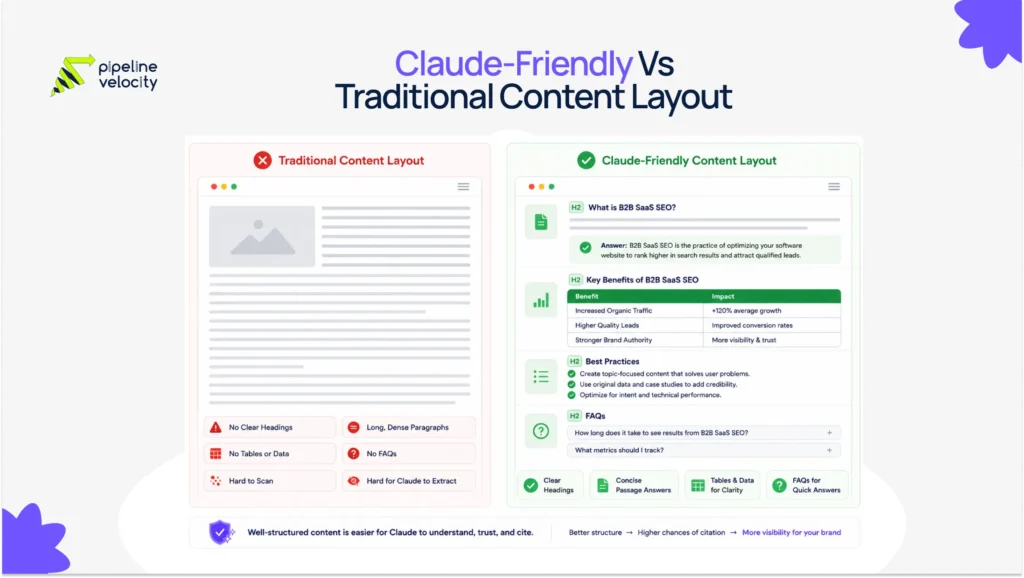
Pipeline Velocity’s SEO services include on-page optimization, content tuning, content clusters, AI Search Optimization and GEO, technical SEO, schema optimization, and performance tracking. These are the same layers needed to make content easier for both search engines and AI answer systems to understand.
How Claude Reads And Uses Structured Content
Claude can use web search when a question needs current or external information. When Claude searches the web, it processes multiple sources and can provide a conversational answer with direct citations, source links, and relevant quotes.
Claude’s citation documentation also shows why source formatting matters. In the Claude API, plain text and PDF documents can be automatically chunked into sentences, while custom content documents allow more control over citation granularity. The documentation also explains that text inside source content is citable, while metadata fields such as title and context are passed to the model but are not used as cited content in the same way.
For website content, the practical lesson is simple. Put the answer in the visible body content. Do not rely only on the title tag, metadata, image text, hidden tabs, or design elements.
A Claude-friendly section should be:
- Clearly labeled.
- Short enough to scan.
- Complete enough to stand alone.
- Supported by evidence where needed.
- Connected to related sections through internal links.
The Claude-Friendly Content Structure
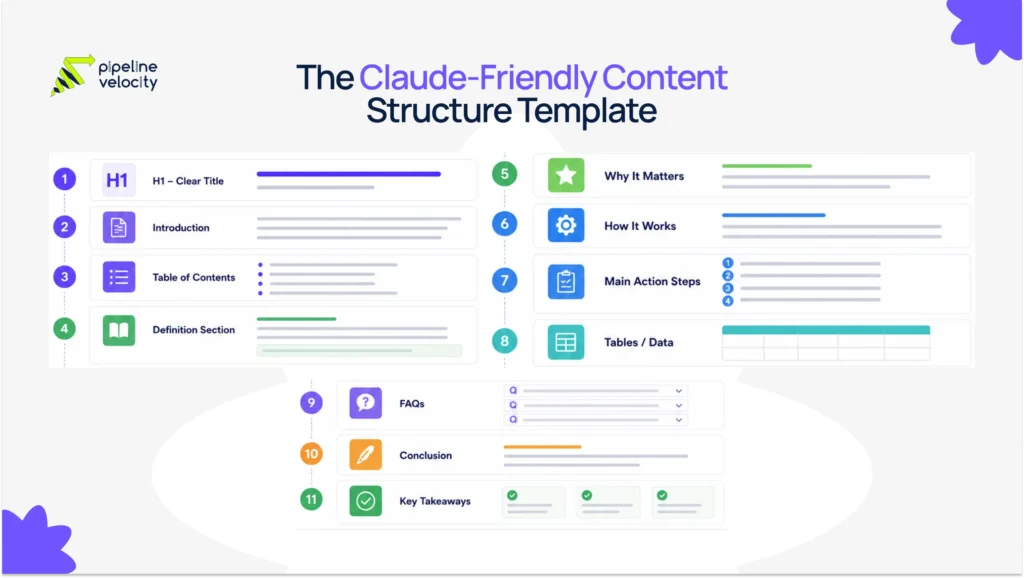
A Claude-friendly content structure gives each idea a clear job.
The page should not feel like a collection of SEO blocks. It should read naturally, but every section should answer a specific user question. This improves readability for humans and makes extraction easier for AI systems.
Use this structure for most informational blog posts:
| Page Section | Purpose | Formatting Tip |
| H1 | Defines the main topic. | Include the primary keyword naturally. |
| Introduction | Hooks the reader and explains the problem. | Keep it human and specific. |
| Table Of Contents | Helps readers scan the page. | Add after the introduction. |
| Definition Section | Explains the core concept. | Use a direct answer paragraph. |
| Why It Matters Section | Builds urgency and relevance. | Use examples and business context. |
| How It Works Section | Explains the mechanism. | Add source-backed explanations. |
| Main How-To Section | Gives practical steps. | Use numbered H3s or short subsections. |
| Tables | Compare options or summarize criteria. | Use only when structure adds clarity. |
| FAQs | Answer long-tail follow-up questions. | Keep answers direct and useful. |
| Conclusion | Summarizes action items. | Include Key Takeaway / TL DR in list format. |
This structure works because it mirrors how people research. They want to know what something is, why it matters, how it works, what to do next, and what mistakes to avoid.
How To Write Passage Answers
A passage answer is a short, self-contained answer placed near the start of a section.
For Claude content formatting, this is one of the most important habits to build. Every H2 should begin with a direct answer before expanding into detail. This gives Claude and human readers a clean summary of the section.
Use this formula:
Answer the question in one or two sentences. Add one specific detail. Add evidence or context when needed.
A good passage answer should be:
- 40 to 80 words.
- Clear without surrounding context.
- Focused on one idea.
- Written in natural language.
- Supported by a source if it includes a factual claim.
- Free from keyword stuffing.
Example Of A Weak Passage Answer
Claude content formatting is important for modern AI SEO because many businesses are now using AI tools and content needs to be better.
This is weak because it is vague. It does not explain what to do or why it works.
Example Of A Strong Passage Answer
Claude content formatting means structuring each page section so the answer is easy to extract and verify. The strongest sections use clear headings, short answer-first paragraphs, source-backed claims, tables where comparison helps, and FAQs that answer natural follow-up questions.
This is stronger because it gives a complete answer in a short passage.
Passage Answer Template
Use this template under each major heading:
| Element | What To Write |
| Direct Answer | State the answer in one sentence. |
| Context | Explain why it matters in one sentence. |
| Proof Or Example | Add a source, example, or practical detail. |
| Next Step | Explain what the reader should do next. |
Example:
A Claude-friendly FAQ answer should directly answer the question in the first sentence, then add context or a practical next step. This format helps readers get value quickly and gives AI systems a clean passage to interpret.
How To Use Tables For Claude Optimization
Tables help Claude when the user needs comparison, criteria, steps, or structured facts.
A table should not be added just to make the page look more optimized. Use tables when information has multiple variables that are easier to understand in rows and columns.
Good table use cases include:
- Feature comparisons.
- Formatting rules.
- Do and do not examples.
- SEO checklists.
- Content audit criteria.
- Page layout templates.
- Before and after improvements.
- Prompt tracking reports.
Averi’s LLM content structure guide argues that tables, FAQs, snippets, schema, and internal links work best when they are part of one cohesive content architecture rather than scattered across a page without purpose.
Best Table Formats For Claude Content Formatting
| Table Type | Best For | Example |
| Comparison Table | Showing differences. | Passage answers vs FAQs. |
| Checklist Table | Auditing a page. | Claude-friendly formatting checklist. |
| Criteria Table | Explaining standards. | What makes a section citation-ready. |
| Template Table | Giving a reusable structure. | Page layout template. |
| Mistake Table | Showing fixes. | Weak heading vs better heading. |
Example Of A Claude-Friendly Table
| Content Element | Weak Format | Better Format |
| Heading | More Details | How Does Claude Use Citations? |
| Paragraph | Long paragraph with five ideas. | Short answer focused on one idea. |
| Table | Decorative table with vague labels. | Comparison table with clear criteria. |
| FAQ | One-sentence generic answer. | Direct answer with useful context. |
| Internal Link | Click here. | Read Pipeline Velocity’s guide to AEO vs SEO. |
A good table should still make sense without the surrounding paragraphs. Use clear column names and concrete language.
When Not To Use A Table
Do not use a table when a short paragraph would be clearer.
Avoid tables when:
- The information is too simple.
- The rows repeat the same idea.
- The table has vague labels.
- The table is only added for design.
- The mobile layout becomes hard to read.
- The content needs narrative explanation.
Claude-friendly formatting is not about adding more elements. It is about choosing the clearest format for the user’s intent.
How To Write FAQs Claude Can Use
FAQs help Claude because they match how people ask questions.
Many Claude prompts are conversational. A user may not search “claude content formatting.” They may ask, “How should I format a blog so Claude can cite it?” or “Do FAQs help with AI citations?” A strong FAQ section captures those follow-up questions in direct language.
A good FAQ answer should:
- Answer the question in the first sentence.
- Stay focused on one intent.
- Add context in two to four sentences.
- Include a source when the answer makes a factual claim.
- Avoid sales-heavy language.
- Use FAQ schema if the questions are visible on the page.
DreamHost’s AI citation guide also recommends question-based headings, direct answers upfront, lists, tables, original data, and clean HTML as part of making content AI citation-ready.
FAQ Formatting Template
Use this structure:
Question
Direct answer. Supporting detail. Practical next step.
Example:
Do Tables Help With Claude Content Formatting?
Yes, tables help when they organize comparison, criteria, or checklist information in a way that is easier to scan. They work best when column labels are specific and each row contains a complete, useful point.
FAQ Question Types To Include
| FAQ Type | Example Question |
| Definition | What Is Claude Content Formatting? |
| Process | How Do You Format Content For Claude? |
| Technical | Does Schema Help Claude Understand Content? |
| Comparison | Are Tables Better Than Bullet Lists? |
| Measurement | How Do You Know If Claude Is Citing Your Content? |
| Risk | What Formatting Mistakes Hurt AI Citations? |
Do not add FAQs just to increase word count. Add them because they answer real follow-up questions.
Claude-Friendly Page Layout Template
Use this template for blog posts, guides, and educational landing pages.
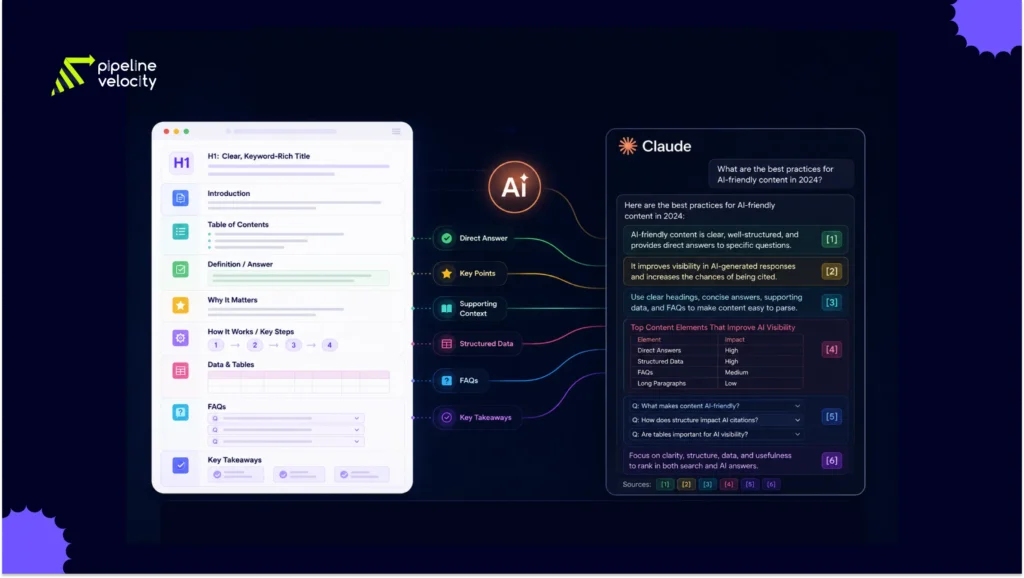
1. H1 With The Primary Topic
The H1 should clearly describe the page. For this article, the H1 is:
Claude-Friendly Formatting: Passage Answers, Tables, FAQs, And Page Layout Template
This works because it includes the primary topic, the content format, and the specific value.
2. Introduction With A Human Hook
The introduction should explain why the topic matters now. It should not sound like a dictionary entry.
Use this structure:
- Start with a sharp observation.
- Explain the reader’s problem.
- Introduce the concept.
- Preview what the guide will cover.
Example:
Claude does not cite content because it is long. It cites content that is clear, useful, and easy to verify. If your best answer is buried halfway down the page, your content may lose visibility even when the advice is correct.
3. Table Of Contents
Place the table of contents after the introduction.
This helps readers move through the page and gives the article a cleaner structure. It is especially useful for long-form guides, pillar pages, and technical explainers.
4. Definition Section
Start with a simple definition.
Example:
Claude content formatting is the process of structuring content so Claude can identify, understand, and cite useful passages in AI-generated answers.
Then expand with examples, use cases, and related concepts.
5. Why It Matters Section
Explain the business value.
For Pipeline Velocity’s audience, this section should connect formatting to:
- AI citations.
- Organic visibility.
- Zero-click search.
- Buyer trust.
- Assisted conversions.
- Content refresh performance.
- Topic authority.
This is where the article should naturally connect to SEO and growth strategy.
6. How It Works Section
Explain the mechanism behind the recommendation.
Use Anthropic documentation where relevant. Claude’s web search can process multiple sources and provide citations, while Anthropic’s crawler documentation separates ClaudeBot, Claude-User, and Claude-SearchBot for different access purposes.
7. Main Action Section
This is the practical core of the article.
For a Claude formatting guide, the main action section should cover:
- Passage answers.
- Tables.
- FAQs.
- Page layout.
- Schema.
- Internal linking.
- Technical formatting.
Each action should have its own H2 or H3.
8. Examples Section
Examples make the advice easier to apply.
Use before and after formatting examples:
| Weak Version | Claude-Friendly Version |
| SEO is changing because AI is important. | Claude-friendly formatting helps AI systems extract clear answers by using direct passages, structured tables, FAQs, and source-backed claims. |
| Read more about this topic. | Read Pipeline Velocity’s guide to AEO vs SEO to understand how answer engines and classic search work together. |
| There are many SEO strategies. | A strong AI-ready SEO strategy includes technical crawl access, content clusters, schema, internal links, and citation-ready page sections. |
9. Checklist Section
Add a checklist near the end for practical use.
Example:
| Formatting Check | Pass Or Fail |
| The H1 clearly explains the page topic. | |
| The introduction includes a useful hook. | |
| Each H2 starts with a direct answer. | |
| Long paragraphs are broken into short sections. | |
| Tables are used for comparison or criteria. | |
| FAQs answer real follow-up questions. | |
| Claims include sources where needed. | |
| Schema matches visible page content. | |
| Internal links support the topic cluster. | |
| Important content is visible in HTML. |
10. FAQ Section
Add FAQs after the main content and before the conclusion.
This captures conversational search intent and gives Claude clean Q&A passages.
11. Conclusion With Key Takeaways
End with a short conclusion and a list-format TL DR.
This helps the reader leave with a clear action plan.
Technical Formatting Rules
Technical formatting makes the content easier to access and parse.
Strong writing will not help much if the page is hard to crawl or poorly structured in HTML. Before publishing, check the technical layer.
Use A Clean Heading Hierarchy
Use one H1. Use H2s for major sections. Use H3s for supporting points.
Avoid skipping heading levels for design reasons. A logical heading structure helps users, search engines, and AI systems understand the relationship between sections.
Keep Important Content Visible
Do not hide the main answer inside:
- Images.
- Accordions that do not render properly.
- Heavy JavaScript.
- Gated PDFs.
- Pop-ups.
- Download-only files.
- Metadata-only fields.
Anthropic’s citation documentation shows that citable content needs to exist in source content, not only in metadata-like fields.
Add Relevant Schema
Use schema to clarify the page.
For a Claude content formatting blog, useful schema types include:
- Article.
- FAQPage.
- BreadcrumbList.
- Organization.
- Person, if there is a named author.
- HowTo, only if the page is genuinely step-by-step.
Schema should match visible content. Do not add FAQ schema for questions that are not present on the page.
Review Claude Crawler Access
Anthropic documents three relevant crawlers. ClaudeBot is related to model training, Claude-User supports user-directed access, and Claude-SearchBot supports search result quality. Anthropic states that disabling Claude-User may reduce visibility for user-directed web search, and disabling Claude-SearchBot may reduce visibility and accuracy in user search results.
From a Claude optimization perspective, do not block these crawlers accidentally. Review robots.txt with SEO, engineering, legal, and leadership before making changes.
Strengthen Internal Links
Internal links help connect your topical map.
For this article, useful internal links include:
- SEO Services
- AEO Vs SEO
- LLM Search Ranking Signals
- How To Optimize A Website For ChatGPT
- Future Of Search Trends And AI SEO
Use internal links where they help the reader continue the journey. Do not force them into every paragraph.
Common Formatting Mistakes
Mistake 1: Using Vague Headings
Vague headings make content harder to understand.
Weak headings include:
- More Information.
- Key Details.
- Things To Know.
- Better Content.
- Final Thoughts.
Better headings include:
- How To Write Passage Answers For Claude.
- When To Use Tables In AI-Ready Content.
- How FAQs Support Claude Content Formatting.
- What Technical Formatting Helps Claude Read A Page.
Specific headings help readers scan and help AI systems understand the section’s purpose.
Mistake 2: Writing Long Paragraphs With Multiple Ideas
Long paragraphs often bury the answer.
A Claude-friendly paragraph should usually focus on one idea. If a paragraph explains headings, schema, FAQs, internal links, and crawler access all at once, split it into smaller sections.
Shorter paragraphs are easier to read and easier to extract.
Mistake 3: Adding Tables Without A Reason
Tables should clarify information.
A table with vague labels does not help. A table with specific criteria, comparisons, and examples does. Use tables when the reader needs to compare options or apply a checklist.
Mistake 4: Treating FAQs As Filler
FAQs should answer real follow-up questions.
Do not add generic questions just to make the page longer. Each FAQ should serve a clear search intent.
Mistake 5: Hiding The Best Answer Too Deep
Claude-friendly pages should answer the main question early.
A detailed article can still have depth, but the first section should quickly explain the topic. Do not make the reader wait until halfway through the page to understand the answer.
Mistake 6: Formatting For AI At The Expense Of Humans
The goal is not to make content sound mechanical.
Claude-friendly formatting should improve human readability first. If a person can scan the page, understand the answer, verify the claim, and take action, the structure is likely better for AI systems too.
How Pipeline Velocity Supports AI-Ready SEO
Claude content formatting works best when it is part of a complete SEO system.
A single well-formatted article can help, but long-term AI visibility usually depends on technical SEO, content clusters, schema, internal linking, authority, and performance tracking. Pipeline Velocity’s SEO services are built around these foundations, including keyword strategy, on-page optimization, AI Search Optimization and GEO, technical SEO, link building, and reporting.
For brands building Claude-friendly content, Pipeline Velocity can support:
- AI search visibility audits.
- Claude content formatting reviews.
- Content structure improvements.
- Topic cluster planning.
- Passage answer optimization.
- FAQ and schema implementation.
- Internal linking strategy.
- Technical SEO checks.
- AI citation tracking.
- Content refresh planning.
The goal is not only to appear in Claude. The goal is to create content that is easier for buyers, search engines, and AI systems to trust.
FAQs
What Is Claude Content Formatting?
Claude content formatting is the process of structuring content so Claude can understand, extract, and cite useful passages. It includes direct answer blocks, clear headings, short paragraphs, tables, FAQs, schema, internal links, and clean technical structure.
Why Is Content Structure Important For Claude?
Content structure is important because Claude may need to identify a specific passage that answers a user’s question. Clear headings, answer-first paragraphs, and structured sections make the page easier to interpret and cite.
Do Tables Help With Claude Optimization?
Yes, tables help when they organize comparisons, checklists, criteria, or structured facts. They are most useful when the row and column labels are specific and the information is easier to understand in a table than in a paragraph.
Do FAQs Help Claude Understand Content?
FAQs help when they answer real follow-up questions in clear language. They match conversational search behavior and create short Q&A passages that are easier for users and AI systems to interpret.
How Long Should A Passage Answer Be?
A passage answer should usually be 40 to 80 words. It should answer the section’s main question directly, include one useful detail, and add a source or example when needed.
Should Every Section Start With A Direct Answer?
Most major sections should start with a direct answer. This improves readability and gives Claude a clearer passage to evaluate. The answer can then be followed by examples, sources, tables, or deeper explanation.
Does Schema Help With Claude Content Formatting?
Schema can help clarify page type, author, organization, breadcrumbs, and FAQ structure. It does not guarantee Claude citations, but it supports machine understanding when the visible content is also strong.
Should I Use FAQPage Schema?
Use FAQPage schema only when the FAQs are visible on the page and genuinely answer user questions. Do not add FAQ schema for hidden or unrelated content.
What Is The Best Page Layout For Claude-Friendly Content?
The best layout includes a clear H1, useful introduction, table of contents, definition section, answer-first H2s, tables where helpful, FAQs, internal links, schema, and a conclusion with Key Takeaway / TL DR.
Can Existing Blogs Be Reformatted For Claude?
Yes. Existing blogs are often the fastest opportunity. Add direct answer blocks, improve headings, break long paragraphs, add useful tables, strengthen FAQs, cite better sources, update schema, and improve internal links.
Conclusion: Key Takeaway / TL DR
Claude-friendly formatting is not about making content look optimized. It is about making content easier to understand, verify, and use.
When your page has clear passage answers, useful tables, focused FAQs, clean HTML, and strong internal links, it becomes better for readers and easier for AI systems to interpret. That is the real value of Claude content formatting.
Key Takeaway / TL DR:
- Claude content formatting helps AI systems retrieve, understand, and cite useful sections of pages.
- Every major H2 should begin with a clear passage answer.
- Tables work best for comparisons, criteria, checklists, and templates.
- FAQs should answer real conversational follow-up questions.
- Clean headings and short paragraphs make content easier to scan.
- Important answers should be visible in the body content, not hidden in metadata or images.
- Schema supports understanding, but it does not replace strong content.
- Claude crawler access should be reviewed carefully in robots.txt.
- Internal links should connect related AI search and SEO topics.
- Pipeline Velocity’s SEO service can support Claude-friendly formatting through technical SEO, content clusters, AEO, GEO, schema, and performance tracking.