


Publishing content is only the first step.
Search engines still need to discover it, crawl it, process it, and decide whether it belongs in the index. If that process is slow, your new blog, refreshed service page, updated product page, or deleted URL may not be reflected in search results as quickly as you need.
That is where IndexNow helps.
IndexNow gives websites a faster way to notify Bing and other participating search engines when URLs are added, updated, or removed. Instead of waiting for crawlers to guess when your site changed, you can send a direct signal that something needs attention.
For SEO teams, this matters because fresh content can support faster Bing indexing, cleaner search results, better crawl efficiency, and stronger visibility across Bing-powered AI experiences. This guide explains how to set up IndexNow, when to use it, how to verify it, and how to integrate it into a serious SEO workflow.
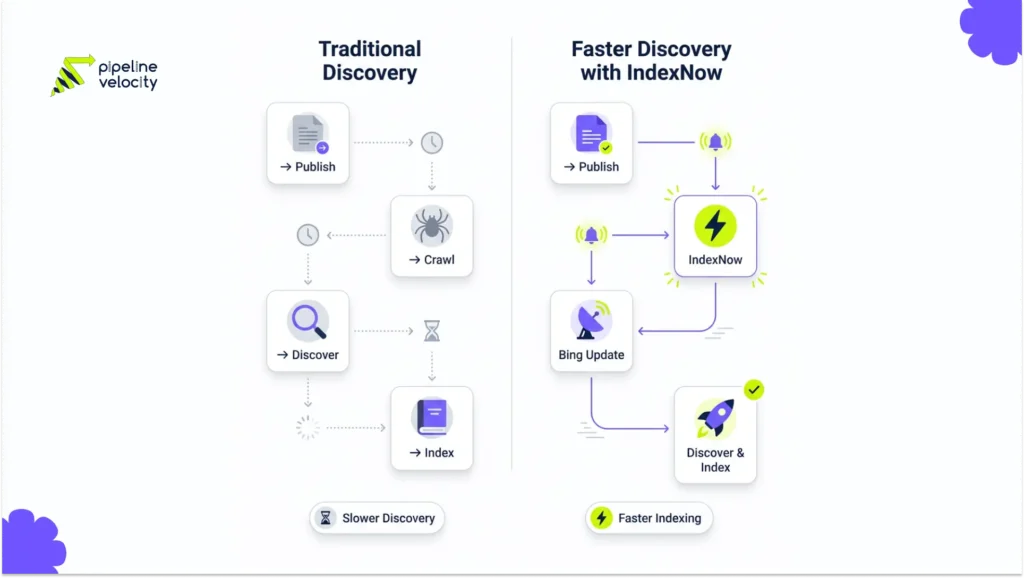
What Is IndexNow?
IndexNow is a free, open-source protocol that lets websites notify participating search engines when content has been added, updated, or deleted.
In simple terms, IndexNow is a push signal. Instead of waiting for Bing to recrawl your website on its own schedule, your website can tell Bing that a specific URL has changed. Bing can then prioritize discovery and decide whether to crawl, update, index, or remove that URL.
Microsoft says IndexNow helps site owners notify multiple search engines about content changes as soon as they happen. This includes new, updated, and deleted content.
IndexNow is useful for:
- New blog posts.
- Updated SEO pages.
- Product or pricing changes.
- News content.
- Deleted pages.
- Redirected URLs.
- Time-sensitive announcements.
- Programmatic content updates.
- Large sites with frequent changes.
- Content refresh campaigns.
IndexNow does not replace SEO. It supports SEO by helping search engines discover changes faster.
Why IndexNow Matters For Bing Indexing
IndexNow matters because Bing indexing depends on discovery.
Before a page can rank in Bing, Bing needs to know the page exists or has changed. A sitemap helps with discovery, but it is not a real-time signal. Traditional crawlers also need to revisit your site repeatedly to find changes. IndexNow gives Bing a more direct update signal.
Microsoft describes IndexNow as a way to fast-track content discovery and reduce dependency on traditional crawlers. It also says timely updates or removals can help search engines keep listings more current.
For SEO, that creates several benefits.
| Benefit | Why It Matters |
| Faster Discovery | Bing can learn about new and updated URLs sooner. |
| Cleaner Indexing | Deleted or changed pages can be reported directly. |
| Better Freshness | Updated facts, services, and product details can be discovered faster. |
| Crawl Efficiency | Search engines do not need to rely only on repeated exploratory crawling. |
| AI Search Freshness | Bing-powered AI systems may reference fresher content when changes are discovered faster. |
Bing’s AI Performance announcement also connects IndexNow to AI freshness, saying faster discovery of content changes helps AI systems reference the most current version of a page when generating answers.
That makes IndexNow more important in 2026 than it was a few years ago. It is not only a Bing SEO tool. It is also part of an AI-ready content freshness workflow.
What IndexNow Does And Does Not Do
IndexNow helps with discovery. It does not guarantee indexing or rankings.
This distinction matters. Some marketers hear “faster indexing” and assume IndexNow will instantly rank every page. That is not how it works.
Microsoft’s IndexNow setup page clearly states that using IndexNow ensures search engines are aware of website changes, but it does not guarantee that pages will be crawled or indexed. It may also take time for changes to appear in search engines.
| IndexNow Does | IndexNow Does Not Do |
| Notify Bing that a URL changed. | Guarantee that Bing will index the page. |
| Help Bing discover new URLs faster. | Guarantee ranking improvements. |
| Report updated or deleted content. | Replace technical SEO. |
| Support freshness for Bing and AI search. | Replace XML sitemaps. |
| Reduce dependency on passive crawling. | Fix thin, duplicate, or low-quality content. |
The best way to think about IndexNow is this:
IndexNow opens the door faster. Your content still needs to deserve a place in the index.
How IndexNow Works
IndexNow works through a simple verification and submission process.
At a high level, your website needs to demonstrate ownership of the URLs being submitted. It does this with an API key. After the key is generated and hosted on the website, URLs can be submitted to the IndexNow endpoint.
Microsoft’s setup documentation describes four core steps: generate an API key, host the key file, submit URLs, and verify submissions in Bing Webmaster Tools.
| Step | What Happens |
| Generate API Key | Create a unique key that proves ownership of the domain. |
| Host Key File | Place the key file at the root of the website or another valid location. |
| Submit URLs | Send new, updated, or deleted URLs to IndexNow. |
| Verify URLs | Use Bing Webmaster Tools to confirm URL submissions were received. |
A simple IndexNow request looks like this:
https://www.bing.com/indexnow?url=https://www.example.com/page-url&key=your-key
For bulk submissions, websites can send multiple URLs through the API. Bing’s URL submission documentation says the URL Submission API allows up to 10,000 URLs per domain per day, with quotas resetting daily at midnight UTC.
Most websites will not need custom API work. If you use WordPress, Cloudflare, or a supported CMS, setup can be much easier.
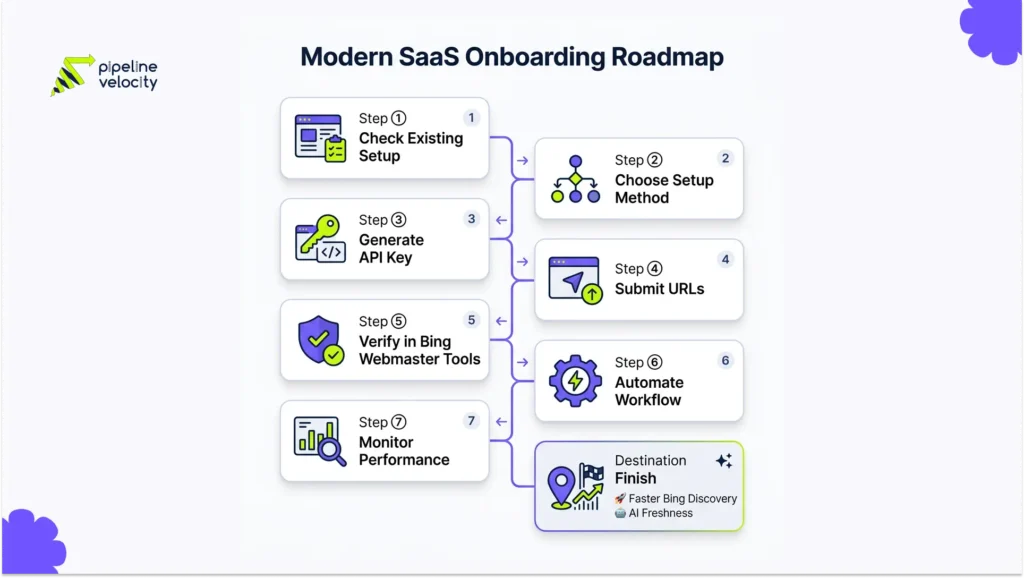
IndexNow Setup Options
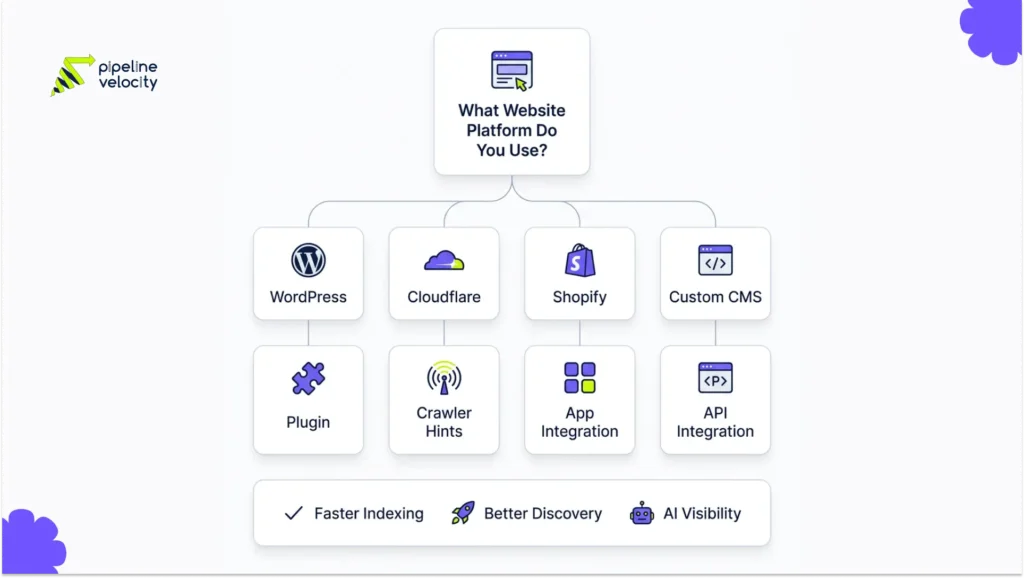
There are several ways to set up IndexNow. The best option depends on your website platform and publishing workflow.
Option 1: Use Built-In CMS Support
Some content management systems already support IndexNow or offer simple integrations. Microsoft’s setup page says some CMS platforms already include IndexNow support, and site owners can check Bing Webmaster Tools to see whether URLs are already being submitted.
This is the easiest path. If your CMS already supports IndexNow, your main job is to verify that submissions are happening correctly.
Option 2: Use A WordPress Plugin
For WordPress sites, a plugin is usually the simplest setup.
The official IndexNow Plugin for WordPress automatically generates and hosts the API key, detects page creation, updates, and deletion, and then submits URLs in the background. It also allows manual URL submission, submission history, retry options, and status checks.
WordPress sites can also use SEO plugins that support IndexNow, such as Rank Math, AIOSEO, Yoast, and SEOPress, which are listed on Microsoft’s IndexNow setup page.
This option is best for:
- Blogs.
- Small business websites.
- B2B service websites.
- Content-heavy WordPress sites.
- Teams without developer support.
Option 3: Enable Cloudflare Crawler Hints
If your website uses Cloudflare, Crawler Hints can support IndexNow.
Cloudflare says Crawler Hints uses cache signals to tell search engines when content has likely changed. Cloudflare also states that Crawler Hints supports IndexNow and can notify search engines when website content is created, updated, or deleted.
This option is useful when:
- Your site is already behind Cloudflare.
- You want a low-code setup.
- You manage frequent content updates.
- You want crawl hints handled closer to the CDN layer.
Cloudflare’s documentation says Crawler Hints is enabled from the Cloudflare dashboard under Configuration.
Option 4: Use A Shopify App Or Platform Integration
For Shopify sites, Microsoft’s IndexNow setup page lists Shopify options, including support for third-party apps.
This is useful for e-commerce stores where products, collections, prices, and availability can often change.
For e-commerce, IndexNow should be used when:
- Products are added.
- Products are removed.
- Product descriptions are updated.
- Collections change.
- Pricing changes.
- Stock or availability changes.
- Important policy pages are updated.
Option 5: Build A Custom API Integration
For custom websites, headless CMS platforms, enterprise websites, or publishing systems, a custom API integration may be the best option.
This lets your development team submit URLs automatically when content changes. It is especially useful for:
- Large publishing sites.
- SaaS documentation hubs.
- Programmatic SEO sites.
- Enterprise websites.
- Marketplaces.
- News websites.
- Websites with custom CMS workflows.
The custom method should only submit URLs when meaningful changes happen. Do not submit the entire website every day.
Step-By-Step IndexNow Setup Guide
Step 1: Check If IndexNow Is Already Active
Before installing anything, check whether your website is already sending IndexNow submissions.
Microsoft recommends connecting to Bing Webmaster Tools to check whether your latest added, modified, or deleted URLs are already being published through IndexNow.
Check:
- Bing Webmaster Tools.
- Your SEO plugin settings.
- CMS indexing settings.
- Cloudflare Crawler Hints.
- Developer documentation.
- Server logs, if available.
If submissions are already active, move to verification and QA.
Step 2: Choose The Best Setup Method
Use the simplest reliable method for your website.
| Website Type | Recommended Method |
| WordPress Blog | IndexNow plugin or SEO plugin integration. |
| WordPress B2B Website | SEO plugin integration or official IndexNow plugin. |
| Cloudflare Site | Enable Crawler Hints. |
| Shopify Store | Shopify app or supported integration. |
| Custom CMS | API integration. |
| Enterprise Site | API integration connected to publishing workflow. |
| News Or High-Frequency Site | API integration plus XML sitemap discipline. |
The best method is the one your team can maintain.
Step 3: Generate And Host The API Key
If you use a plugin or Cloudflare, this may happen automatically.
For manual setup, generate an IndexNow API key and host it as a UTF-8 text file at the root of your website or another valid location. Microsoft’s setup documentation states that the key file can be hosted at the root or in another location on the same host.
Example: https://www.example.com/your-indexnow-key.txt
The file should contain the key and be accessible to search engines.
Step 4: Submit New Or Updated URLs
After the key is active, submit URLs when content changes.
For a single URL, the request format can look like this:
https://www.bing.com/indexnow?url=https://www.example.com/new-page&key=your-key
For larger sites, use bulk API submissions or automated workflows from your CMS.
Submit only URLs that have actually changed. Microsoft says you should publish only URLs that have changed after you started using IndexNow, not old URLs that changed last year.
Step 5: Verify Submissions In Bing Webmaster Tools
After setup, verify that Bing is receiving your URLs.
Bing Webmaster Tools can be used to verify whether search engines are receiving URLs.
Check:
- IndexNow submission status.
- Recent submissions.
- Failed submissions.
- URL inspection.
- Crawl status.
- Indexing status.
- SEO errors.
- Markup issues.
Bing’s URL inspection tool can show crawl issues, index status, SEO errors, and markup details for selected URLs.
Step 6: Connect IndexNow To Your Publishing Workflow
IndexNow works best when it is automatic.
Your process should trigger IndexNow when:
- A post is published.
- A post is updated.
- A service page is refreshed.
- A product page changes.
- A page is deleted.
- A URL is redirected.
- A major metadata change is made.
- A sitemap is updated.
For content teams, add IndexNow to the publish checklist. For developers, connect it to the CMS event system.
Step 7: Monitor Indexing And Performance
IndexNow tells Bing that a URL changed. It does not prove that the page is performing.
After submission, monitor:
- Bing indexing status.
- Bing impressions.
- Bing clicks.
- Keyword rankings.
- Crawl errors.
- AI Performance citations.
- Grounding queries.
- Organic conversions.
- Content refresh impact.
This is where IndexNow becomes part of SEO, not just a technical setup.
When To Submit URLs With IndexNow
Use IndexNow when the URL has changed in a meaningful way.
Do not submit every page repeatedly without changes. That creates noise and does not improve SEO.
| Situation | Submit With IndexNow? | Why |
| New blog published | Yes | Bing needs to discover it. |
| Existing guide updated | Yes | Bing should learn about the fresh version. |
| Service page rewritten | Yes | Important commercial content changed. |
| Product price updated | Yes | Search results should reflect accurate information. |
| Product deleted | Yes | Helps search engines detect removal faster. |
| Page redirected | Yes | Helps Bing process the URL change. |
| Minor typo fixed | Usually no | Not a meaningful indexing update. |
| Internal draft created | No | Drafts should not be submitted. |
| Noindex page updated | No | It should not be indexed. |
| Thin page published | No | Fix the content before submission. |
Bing’s content removal documentation says that if a page is deleted, moved, or updated, submitting the URL change through IndexNow can help Bing and Copilot detect it more quickly.
How To Verify IndexNow Is Working
Verification matters because setup errors are common.
Use these checks after setup.
Check 1: Confirm The API Key Is Accessible
Visit the key file location in a browser.
The page should load and show the API key. If it returns 404, 403, or a redirect loop, search engines may not be able to verify ownership.
Check 2: Review Plugin Or CMS Logs
If using WordPress, review the plugin’s submission history.
The official IndexNow WordPress plugin includes recent URL submissions, failed submission status, retry options, and submission downloads.
Check 3: Use Bing Webmaster Tools
Check Bing Webmaster Tools for IndexNow activity, URL inspection, crawl status, indexing status, and SEO issues.
The URL inspection tool helps check whether Bing can crawl and index a URL, and it can show SEO and markup issues.
Check 4: Test A Single URL
Publish or update one low-risk page and submit it.
Then check:
- Was the URL submitted successfully?
- Did the API return a 200 response?
- Does Bing Webmaster Tools show activity?
- Is the page indexable?
- Is it included in the sitemap?
- Does URL inspection show errors?
Microsoft’s setup documentation lists 200 as a successful response, with common errors including 400 for invalid format, 403 for invalid key, 422 for URL and host mismatch, and 429 for too many requests.
Check 5: Review Bing Search Performance Over Time
Do not expect immediate ranking changes from one submission.
Watch performance over days and weeks. Look for:
- New impressions.
- Fresh crawl data.
- Improved index coverage.
- Search query visibility.
- AI citation changes.
- Bing traffic growth.
IndexNow is a discovery accelerator. SEO results still depend on content quality, relevance, authority, and technical health.
IndexNow And AI Visibility
IndexNow now matters for AI search because Bing is connected to Microsoft’s AI discovery ecosystem.
Bing’s AI Performance Report shows when websites are cited in AI-generated answers across Microsoft Copilot, Bing AI-generated summaries, and select partner integrations. Microsoft’s announcement also recommends keeping content fresh and accurate, and states that IndexNow helps AI systems reference the most current version of a page when generating answers.
For SEO teams, this creates a practical workflow:
- Refresh an important page.
- Improve clarity, headings, FAQs, and sources.
- Submit the updated URL through IndexNow.
- Monitor Bing indexing.
- Monitor Bing AI Performance.
- Review whether citations, grounding queries, or visibility patterns change.
This does not mean IndexNow guarantees AI citations. It means IndexNow helps Bing and related systems discover fresh versions of your pages faster.
For brands investing in AI search, LLMO, GEO, or AEO, IndexNow should be part of the technical foundation.
Common IndexNow Mistakes
Mistake 1: Expecting Guaranteed Rankings
IndexNow does not guarantee rankings.
It helps Bing discover content changes. The page still needs to be useful, relevant, crawlable, and strong enough to be indexed and ranked. Microsoft explicitly says IndexNow does not guarantee crawling or indexing.
Mistake 2: Submitting Low-Quality URLs
Do not use IndexNow to push thin pages, duplicate pages, internal search pages, tag archives, or low-value URLs.
If the page should not rank, do not submit it.
Mistake 3: Submitting Noindex Pages
If a page has a noindex tag, submitting it through IndexNow does not make sense.
First decide whether the page should be indexable. Then fix the noindex directive if needed.
Mistake 4: Replacing Sitemaps With IndexNow
IndexNow and sitemaps work together.
A sitemap gives search engines a structured list of important URLs. IndexNow notifies search engines when specific URLs change. Bing’s AI-powered search sitemap guidance recommends using IndexNow for real-time URL submission and referencing your sitemap in robots.txt for consistent discovery.
Mistake 5: Submitting Every URL Every Day
Do not spam the API.
Submit URLs when they are added, updated, or deleted. Large sites should prioritize important URLs and meaningful changes.
Mistake 6: Forgetting Deleted Or Redirected URLs
IndexNow is not only for new content.
Use it when important pages are deleted, moved, or redirected. This helps Bing and Copilot detect changes more quickly.
Mistake 7: Not Checking Bing Webmaster Tools
Setup is not complete until you verify submissions and monitor indexing.
Use Bing Webmaster Tools to check URL inspection, indexing status, IndexNow activity, SEO errors, and performance data.
How Pipeline Velocity Supports Bing Indexing And SEO
IndexNow is useful, but it is only one part of SEO.
Faster discovery does not help much if the content is weak, the site is hard to crawl, the internal links are poor, or the page does not satisfy search intent. That is why IndexNow should sit inside a larger SEO system.
Pipeline Velocity’s SEO services include keyword strategy, content clusters, on-page optimization, technical SEO, AI Search Optimization and GEO, schema optimization, link building, and performance tracking. These are the same foundations that make IndexNow more valuable.
For teams focused on Bing indexing and AI visibility, Pipeline Velocity can support:
- Bing Webmaster Tools setup.
- IndexNow implementation planning.
- Technical SEO audits.
- Sitemap and robots.txt review.
- Content refresh workflows.
- Schema optimization.
- Internal linking improvements.
- AI-ready content structure.
- Bing indexing checks.
- AI Performance reporting.
- SEO dashboards tied to traffic, rankings, and pipeline.
The goal is not just to submit URLs faster. The goal is to make sure the right pages are discoverable, indexable, useful, and connected to business growth.
FAQs
What Is IndexNow?
IndexNow is a free, open-source protocol that lets websites notify participating search engines when URLs are added, updated, or deleted. It helps search engines discover content changes faster.
Does IndexNow Help With Bing Indexing?
Yes, IndexNow can help Bing discover new, updated, or deleted URLs faster. It does not guarantee that Bing will crawl, index, or rank the page, but it improves the discovery signal.
How Do I Set Up IndexNow?
To set up IndexNow, generate an API key, host the key file on your website, submit URLs when they change, and verify submissions in Bing Webmaster Tools. WordPress, Cloudflare, Shopify, and some CMS platforms also offer easier setup options.
Is There An IndexNow Plugin For WordPress?
Yes. The official IndexNow WordPress plugin can automatically generate and host the API key, detect new, updated, or deleted pages, and submit URLs in the background.
Does Cloudflare Support IndexNow?
Yes. Cloudflare’s Crawler Hints supports IndexNow and can notify search engines when website content is created, updated, or deleted.
Does IndexNow Replace XML Sitemaps?
No. IndexNow does not replace XML sitemaps. Use sitemaps to help search engines understand your important URLs, and use IndexNow to notify them when specific URLs change.
Should I Submit Old URLs Through IndexNow?
No, not unless they have changed. Microsoft says you should submit only URLs that changed after you started using IndexNow, not old URLs changed last year.
How Many URLs Can I Submit To Bing?
Bing’s URL Submission API allows up to 10,000 URLs per domain per day, with quotas resetting daily at midnight UTC.
Does IndexNow Help With AI Search Visibility?
IndexNow can support AI visibility by helping Bing discover fresh content changes faster. Microsoft says IndexNow helps AI systems reference the most current version of a page when generating answers.
Why Is My Submitted URL Not Indexed?
A submitted URL may not be indexed if it is low quality, blocked by robots.txt, marked noindex, canonicalized elsewhere, duplicated, inaccessible, slow, thin, or not useful enough for Bing’s index. IndexNow notifies Bing of the change, but indexing decisions still depend on Bing’s systems.
Conclusion:
IndexNow is one of the simplest ways to help Bing discover new and updated content faster.
It will not fix weak SEO. It will not guarantee rankings. But when paired with strong content, technical SEO, XML sitemaps, schema markup, internal linking, and Bing Webmaster Tools, it can make your indexing workflow faster and cleaner.
Key Takeaway / TL DR:
- IndexNow notifies participating search engines when URLs are added, updated, or deleted.
- It helps with faster Bing discovery, but it does not guarantee indexing or rankings.
- WordPress sites can use the official IndexNow plugin or SEO plugins that support IndexNow.
- Cloudflare users can enable Crawler Hints to support IndexNow.
- Custom websites can use the API method with an API key and hosted key file.
- Submit URLs only when they meaningfully change.
- Use IndexNow for new pages, refreshed content, deleted pages, redirects, and important updates.
- Keep XML sitemaps active because IndexNow does not replace them.
- Verify submissions in Bing Webmaster Tools and inspect important URLs.
- IndexNow can enhance AI visibility by helping Bing-powered systems discover fresher versions of pages.
- Pipeline Velocity’s SEO service can help connect IndexNow setup with technical SEO, content refreshes, Bing indexing, schema, AI search visibility, and performance reporting.