


Submitting a URL is not the same as getting indexed.
That is the first thing every SEO team needs to understand about Brave Search. You can request that Brave re-fetch a page, but the page still needs to be crawlable, indexable, useful, internally linked, and strong enough to appear in Brave’s independent search index.
Brave Search matters because it is not just another privacy browser feature. Brave Search uses its own independent index, supports AI-powered answers, and powers search data through the Brave Search API. Brave says its Search API is powered by the same independent web index that powers Brave Search, and that this index is used in traditional search products, AI search engines, AI training, and agentic search.
This guide explains how to submit a URL to Brave Search, how to prepare pages for Brave Search indexing, and how to monitor whether your content is actually appearing after submission.
Can You Submit A URL To Brave Search?
Yes, you can submit a URL to Brave Search through Brave’s public Submit URL page, but it should be treated as a re-fetch and discovery request, not a guaranteed indexing tool.
This distinction matters. Brave has a submission page, and its help documentation guides site owners on submitting pages for re-fetching when content is updated, removed, or needs to be delisted. Brave also says that if Brave Search does not have the latest version of a page, site owners can submit the page to help Brave return it.
However, Brave does not offer the same kind of full webmaster dashboard that SEO teams get from Google Search Console or Bing Webmaster Tools. There is no public Brave equivalent with index coverage reports, crawl error exports, sitemap status, or query performance dashboards.
That means the right workflow is not “submit and hope.”
The better workflow is:
- Make sure the page is technically indexable.
- Make sure the page is crawlable by Googlebot.
- Make sure the content is useful and internally linked.
- Submit the URL to Brave Search.
- Monitor Brave results manually.
- Improve content and authority signals if the page does not appear.
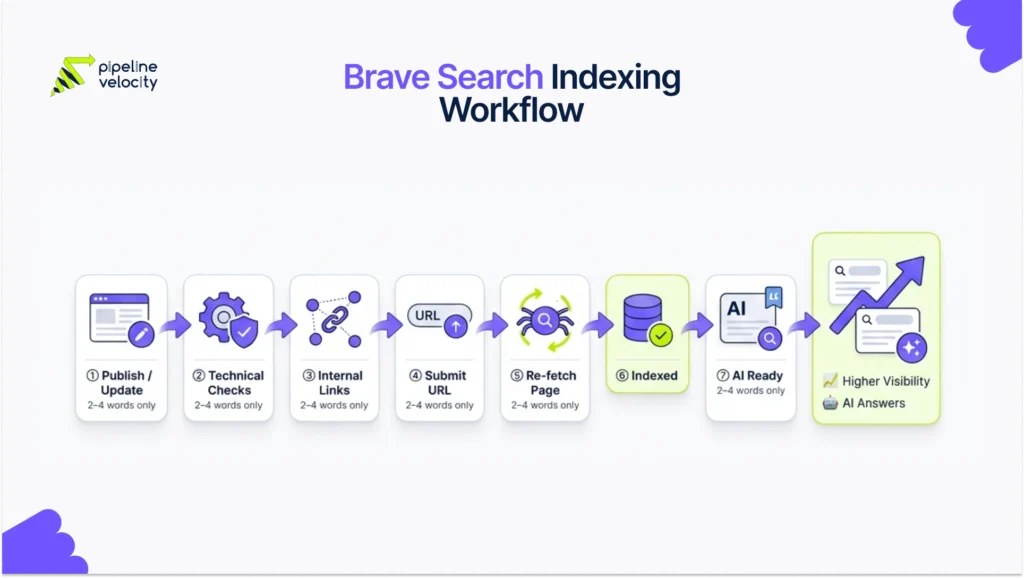
How Brave Search Indexing Works
Brave Search indexing starts with crawling, but Brave’s crawler has a few important rules that SEO teams need to know.
Brave says its crawler discovers new pages and indexes their content like other search engines. Brave also says its crawler does not advertise a differentiated user agent. Most importantly, if a domain or page is not crawlable by Googlebot, Brave Search’s bot will not crawl it either.
That creates a simple rule:
Before submitting a URL to Brave Search, make sure Googlebot can crawl it.
Brave also says robots.txt is not used to prevent a page from being indexed. If a site owner wants to delist a page, Brave recommends using a robots noindex directive and waiting for Brave to re-fetch the page.
Brave indexing is also supported by the Web Discovery Project. This is an opt-in, privacy-preserving system in which Brave browser users can anonymously contribute data on searches and webpage visits. Brave says this data helps build its independent index and improve the relevance of results.
When To Submit A URL To Brave Search
Submit a URL to Brave Search when the page has changed in a way that Brave should know about.
Do not submit every page repeatedly without a reason. Use submission as part of a clear indexing workflow.
| Situation | Submit To Brave? | Why |
| A new important blog has been published | Yes | Brave may need help discovering the page. |
| Existing article refreshed | Yes | Brave may need to re-fetch the latest version. |
| Service page updated | Yes | Important business content has changed. |
| Page moved to a new URL | Yes | Brave may need to process the new URL. |
| Old page removed | Yes | Brave can re-fetch and detect removal. |
| Page now returns 404 or 410 | Yes | Brave says these status codes can be automatically removed after re-fetching. |
| Minor typo fixed | Usually no | Not a meaningful indexing update. |
| Draft or noindex page created | No | It should not be indexed. |
| Duplicate page published | No | Fix duplication before submission. |
| Thin AI-generated page published | No | Improve the content before submission. |
Brave’s contact documentation says removed pages will eventually drop out of the index once re-fetched, and that pages returning 404 or 410 can be automatically removed. It also says updated pages can be submitted when Brave does not show the latest version.
Before You Submit: Brave Search Indexing Checklist
Do not submit a URL until the page is ready.
Submission cannot fix weak content, blocked crawling, bad canonicals, duplicate pages, or poor internal linking. Use this checklist first.
Technical Checklist
| Check | Requirement |
| Status Code | Page returns 200 if it should be indexed. |
| Robots.txt | Important pages are not blocked from major crawlers. |
| Googlebot Access | Page is crawlable by Googlebot. |
| Noindex | Page does not contain noindex if it should appear in Brave. |
| Canonical | Canonical tag points to the correct indexable URL. |
| Sitemap | URL appears in the XML sitemap where relevant. |
| Internal Links | Page is linked from at least one relevant page. |
| Mobile Usability | Page works well on mobile. |
| HTML Content | Main content is visible in crawlable HTML. |
| Page Speed | Page loads quickly and does not depend on heavy scripts for core content. |
The Googlebot check is especially important because Brave says its bot will not crawl a page that is not crawlable by Googlebot.
Content Checklist
| Check | Requirement |
| Search Intent | Page clearly answers the target query. |
| H1 | H1 matches the main topic. |
| Introduction | First few lines explain why the page matters. |
| Direct Answer | Main query is answered near the top. |
| Headings | H2s and H3s are specific and useful. |
| Original Value | Page adds something beyond generic summaries. |
| Sources | Factual claims are supported where needed. |
| FAQs | Long-tail questions are answered naturally. |
| Internal Links | Related pages are linked with descriptive anchors. |
| Conclusion | Page ends with useful takeaways. |
Authority Checklist
| Check | Requirement |
| Internal Authority | Important pages link to the URL. |
| Topic Cluster | Page fits into a broader content cluster. |
| External Mentions | Brand or page has relevant third-party references. |
| Backlinks | Page or domain has trustworthy links. |
| Brand Clarity | Page clearly connects to the company’s expertise. |
| User Value | Page is useful enough for people to read, share, or revisit. |
Brave’s Web Discovery Project documentation says Brave uses privacy-preserving signals to understand result relevance, including whether search results are clicked, what pages are popular or novel, and whether users find pages valuable.
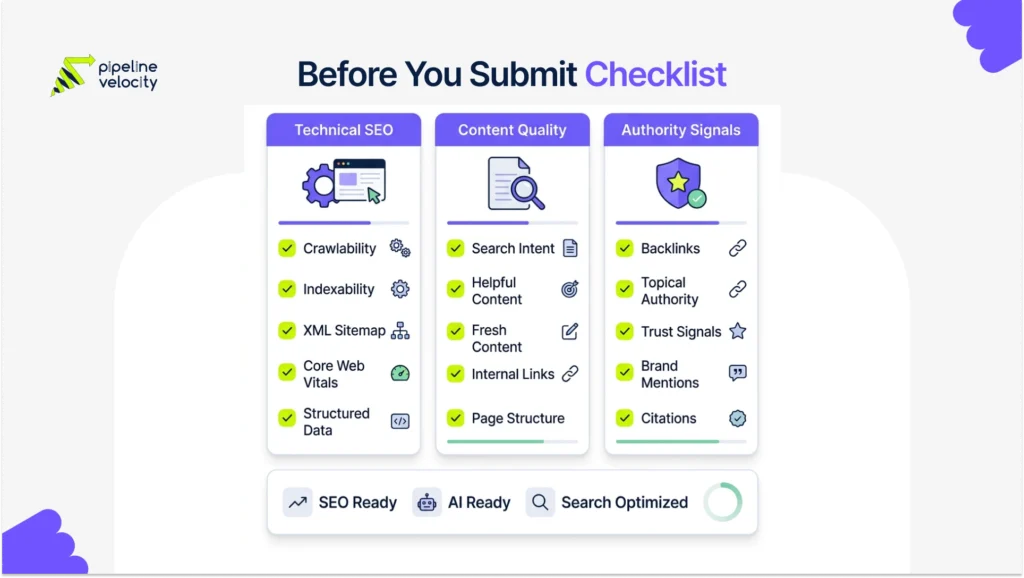
How To Submit A URL To Brave Search
To submit a URL to Brave Search, use Brave’s public Submit URL page and submit the exact canonical URL you want Brave to re-fetch.
Follow this workflow:
- Open Brave’s Submit URL page.
- Enter the full canonical URL.
- Make sure the URL uses the correct protocol, such as https.
- Submit only one clean final URL, not a redirected version.
- Wait for Brave to re-fetch and process the page.
- Monitor Brave Search manually over the next few days and weeks.
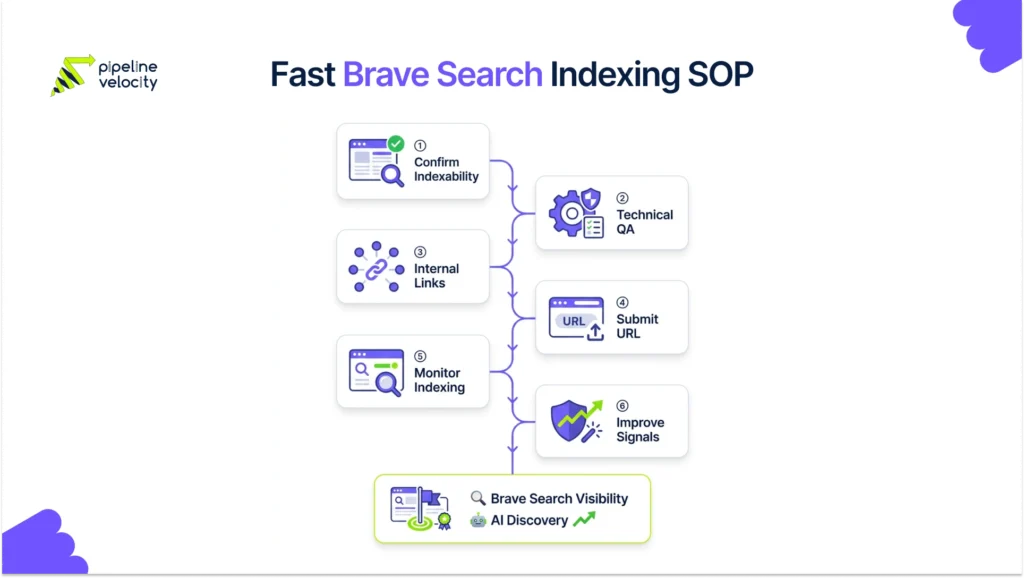
Fast Indexing Workflow For New And Updated Content
A fast Brave Search indexing workflow should start before submission.
Use this SOP for every important page you publish or refresh.
Step 1: Confirm The URL Should Be Indexed
Not every page deserves indexing.
Index pages that are useful, original, and relevant to search demand. Do not index tag archives, thin filters, duplicate category pages, internal search results, or weak programmatic pages.
Step 2: Run A Technical Preflight
Check:
- Page returns 200.
- Page is not blocked by robots.txt.
- Page is crawlable by Googlebot.
- Page does not have noindex.
- Canonical points to itself or the correct target.
- Page appears in the sitemap.
- Page loads correctly on mobile.
- Main content is visible without relying on hidden scripts.
Step 3: Add Internal Links
Before submission, add internal links from relevant pages.
For example, a Brave indexing article should link from related pages such as:
- How To Rank In Brave Search
- Large Language Model Optimization
- LLM Search Ranking Signals
- SEO Services
Internal links help search engines and users discover the page. They also help clarify the page’s role inside the topic cluster.
Step 4: Submit The URL To Brave Search
Submit the clean canonical URL through Brave’s Submit URL page.
Do this after the page is live, linked, and technically ready.
Step 5: Monitor Indexing Manually
Because Brave does not provide a full webmaster dashboard, manual monitoring matters.
Track:
- Exact URL search.
- Site search.
- Branded query visibility.
- Target keyword visibility.
- Snippet freshness.
- Title and meta display.
- Whether old page versions still appear.
- Whether removed URLs disappear.
Step 6: Strengthen Signals If The Page Does Not Appear
If the page does not appear after submission, do not keep submitting it every day.
Improve:
- Internal links.
- Content depth.
- Page title.
- H1 and headings.
- Original examples.
- Source quality.
- Backlinks.
- Brand mentions.
- Technical accessibility.
- Sitemap consistency.
Then submit the URL again only after meaningful changes.
How To Know If Brave Has Indexed Your URL
Use multiple checks. One search is not enough.
Exact URL Search
Search the full URL in Brave.
If the page appears, it is likely indexed or at least discoverable in Brave results.
Site Search
Search:
site:example.com topic
This helps check whether Brave has indexed pages from your domain around that topic.
Exact Title Search
Search the exact page title in quotation marks.
If the page does not appear for its exact title, Brave may not have indexed it yet or may not consider it strong enough to return.
Branded Topic Search
Search:
brand name + page topic
This helps check whether Brave associates the page topic with your brand.
Snippet Freshness Check
If the page appears, check whether Brave shows:
- Correct title.
- Correct description.
- Updated content.
- Current page version.
- Correct canonical URL.
- No outdated information removed.
If Brave shows an outdated version, submit the URL again after confirming the page has changed and is crawlable.
What To Do If Brave Does Not Index Your Page
If Brave does not index your page, do not assume the submission failed. Diagnose the page.
Issue 1: The Page Is Not Crawlable By Googlebot
This is the first thing to check.
Brave says if a domain or page is not crawlable by Googlebot, Brave Search’s bot will not crawl it either.
Fix:
- Review robots.txt.
- Check server firewall rules.
- Review bot protection settings.
- Test the page in Google Search Console.
- Make sure important content is not blocked.
Issue 2: The Page Has Noindex
If the page has noindex, Brave may not index it.
Fix:
- Remove accidental noindex.
- Confirm canonical URL is indexable.
- Recheck the page source.
- Submit the updated URL again.
Issue 3: The Canonical Points Elsewhere
If the canonical tag points to another URL, Brave may choose not to index the submitted URL.
Fix:
- Correct the canonical tag.
- Make sure internal links point to the canonical URL.
- Submit the canonical URL, not a duplicate.
Issue 4: The Page Has Weak Internal Links
Pages with no internal links are harder to discover and evaluate.
Fix:
- Link from relevant blog posts.
- Link from category or hub pages.
- Link from service pages where natural.
- Use descriptive anchor text.
Issue 5: The Content Is Too Thin Or Duplicate
Submission cannot make weak content index-worthy.
Fix:
- Add original examples.
- Expand the answer.
- Add FAQs.
- Add sources.
- Add a table or checklist.
- Merge duplicate pages.
- Improve the introduction and headings.
Issue 6: The Topic Has Weak External Signals
New sites or isolated pages may need stronger signals.
Fix:
- Earn relevant backlinks.
- Build brand mentions.
- Publish related supporting content.
- Share the page through relevant channels.
- Add the page to a broader content cluster.
How Brave Indexing Supports AI Visibility
Brave indexing matters because Brave Search is also connected to AI-powered answers and AI search data.
Brave’s Answer With AI feature synthesizes information from multiple sources into a single answer and provides sources alongside traditional search results. Brave says the answers come from its independent search index at scale.
Brave’s Search API is also used in AI search engines, AI training, and agentic search, according to Brave’s own API documentation.
That means Brave indexing is not only about traditional search rankings. It may also support visibility in AI-powered discovery experiences that rely on Brave’s index or API.
To improve AI visibility from Brave-indexed content:
- Use clear answer-first sections.
- Add concise definitions.
- Use tables for comparisons.
- Support factual claims with sources.
- Add FAQs.
- Keep pages updated.
- Build topic clusters.
- Strengthen brand authority.
- Make pages easy to crawl and parse.
This is where Brave Search indexing connects to broader AI SEO, LLMO, GEO, and AEO work.
Common Mistakes To Avoid
Mistake 1: Treating Submission As A Ranking Shortcut
Submitting a URL to Brave Search does not guarantee indexing, rankings, or traffic.
It only helps Brave discover or re-fetch a page. The page still needs to be technically accessible, useful, and trusted.
Mistake 2: Blocking Googlebot
This is the most important Brave-specific technical mistake.
If the page is not crawlable by Googlebot, Brave says its bot will not crawl it.
Mistake 3: Submitting Non-Canonical URLs
Do not submit redirected, parameter-heavy, tracking, or duplicate URLs.
Submit the clean canonical version only.
Mistake 4: Submitting Weak Pages
Do not submit thin, duplicate, or unfinished content.
Fix the page first. Then submit it.
Mistake 5: Ignoring Noindex
A noindex page is not a good candidate for submission unless your goal is removal or delisting.
Brave says noindex is the right directive for delisting pages from Brave Search.
Mistake 6: Skipping Monitoring
Brave does not give you a full webmaster dashboard, so you need your own SOP.
Track submission date, index status, query visibility, snippet freshness, and follow-up actions.
Mistake 7: Forgetting Internal Links
A submitted page with no internal links is a weak signal.
Build links from related pages before submission.
Mistake 8: Thinking Brave Works Exactly Like Google
Brave uses its own independent index and ranking models, and Brave says its Search API does not repackage Google or Bing results.
Use Google SEO fundamentals, but do not assume Google indexing equals Brave indexing.
How Pipeline Velocity Supports Brave Search Indexing
Brave Search indexing works best when it is part of a complete SEO system.
Submitting a URL is only one step. The page also needs technical health, crawlability, content quality, internal links, schema, authority signals, and a broader topic cluster. That is where a structured SEO strategy matters.
Pipeline Velocity’s SEO services support this work through keyword strategy, content clusters, on-page optimization, technical SEO, AI Search Optimization and GEO, link building, schema optimization, and performance tracking.
For brands trying to improve Brave Search indexing, Pipeline Velocity can support:
- Brave Search indexing audits.
- Technical crawlability checks.
- Googlebot access testing.
- Noindex and canonical reviews.
- Internal linking improvements.
- Content refresh workflows.
- Topic cluster planning.
- Schema optimization.
- Authority and link-building strategy.
- AI answer readiness.
- Manual Brave visibility monitoring.
- Search performance reporting tied to qualified pipeline.
The goal is not just to submit a URL. The goal is to build pages that Brave can discover, understand, index, rank, and potentially use in AI-powered answers.
FAQs
Can You Submit A URL To Brave Search?
Yes. Brave has a public Submit URL page that can be used to submit pages for re-fetching. Brave’s help documentation also links to this submission path for updated pages, removed pages, and delisting workflows.
Does Submitting A URL Guarantee Brave Search Indexing?
No. Submitting a URL does not guarantee indexing or ranking. It helps Brave discover or re-fetch a page, but the page still needs to be crawlable, indexable, useful, and trusted.
How Does Brave Search Index Pages?
Brave Search uses a crawler to discover and index pages. Brave also says its crawler does not advertise a differentiated user agent and will not crawl pages that are not crawlable by Googlebot.
Does Brave Have Webmaster Tools?
Brave does not currently provide a full public webmaster platform like Google Search Console or Bing Webmaster Tools. Site owners need to use the Submit URL page, technical SEO checks, manual SERP monitoring, and third-party tracking workflows.
Should I Submit My Sitemap To Brave Search?
Brave does not currently provide a public sitemap submission dashboard like Bing Webmaster Tools. You should still maintain a clean XML sitemap because it helps general crawler discovery and supports broader SEO.
How Do I Check If Brave Indexed My URL?
Search the exact URL, exact page title, branded topic query, and site: query in Brave Search. Also check whether Brave shows the current title, snippet, and URL.
Why Is My Page Not Showing In Brave Search?
Your page may not show in Brave Search if it is blocked, not crawlable by Googlebot, marked noindex, canonicalized elsewhere, thin, duplicate, weakly linked, or not trusted enough to appear in the index.
Can I Remove A Page From Brave Search?
Yes. Brave recommends using the robots noindex directive to delist a page. Brave needs to re-fetch the page before the change can be applied.
What If Brave Shows An Old Version Of My Page?
If Brave does not show the latest version of your page, Brave’s contact documentation says you can submit the page for re-fetching.
Does Brave Search Indexing Help With AI Visibility?
It can. Brave’s Answer With AI uses sources alongside traditional search results, and Brave’s Search API is powered by the same independent index used by Brave Search. Strong Brave indexing can support broader visibility in Brave-powered search and AI experiences.
Conclusion:
Submitting a URL to Brave Search is useful, but it is not a magic indexing button.
The real advantage comes from combining submission with technical SEO, strong internal links, useful content, authority signals, and a clear monitoring process. Brave Search uses its own independent index, so your visibility depends on whether Brave can crawl, understand, trust, and refresh your pages.
Key Takeaway / TL; DR:
- You can submit a URL to Brave Search through Brave’s public Submit URL page.
- Submission helps request discovery or re-fetching, but it does not guarantee indexing or ranking.
- Before submitting, make sure the page is crawlable, indexable, canonicalized correctly, and useful.
- Brave says pages must be crawlable by Googlebot for Brave’s bot to crawl them.
- Use noindex when you want Brave to delist a page.
- Submit updated pages when Brave shows an old version.
- Submit removed pages when they return 404 or 410.
- Add internal links before submitting new or refreshed pages.
- Monitor Brave manually using exact URL, exact title, branded, and site: searches.
- Improve content, internal links, and authority if the page does not appear.
- Brave indexing can also support AI visibility through Brave Answer With AI and Brave’s independent search API.
- Pipeline Velocity’s SEO service can help connect Brave Search indexing with technical SEO, content clusters, authority building, schema, AI Search Optimization, and performance reporting.

Saurav Thakur
Saurav Thakur is an SEO strategist specializing in technical SEO, content strategy, semantic SEO, AI search optimization, keyword research, and organic growth. He helps businesses improve visibility across traditional search and emerging AI-driven search experiences through data-led, user-focused SEO strategies.