

Crawl budget optimization is the process of helping Google spend more of its crawl activity on valuable, current URLs and less on duplicate, infinite or low-value URL inventory. It matters mainly for very large, fast-changing sites or sites showing crawl and discovery problems. Most small sites should fix indexability, internal linking and content quality first.
Key Takeaways
- Confirm that crawl capacity or demand is actually constraining important URLs before optimizing it.
- Diagnose with server logs, Search Console Crawl Stats, indexing reports and a full URL inventory.
- Control faceted navigation, parameters, calendars, internal search and duplicate URL patterns at the source.
- Use redirects, status codes, canonicals, noindex and robots.txt for different jobs.
- Keep XML sitemaps limited to canonical, indexable URLs you want discovered.
- Improve internal links and page value so important URLs are easy to find and worth revisiting.
- Validate every rule on samples, monitor unintended effects and keep a rollback plan.
What Is Crawl Budget?
Crawl budget is a practical way to describe how much crawling Google can and wants to do on a site. Capacity reflects how quickly Googlebot can fetch without causing server problems. Demand reflects factors such as URL importance, freshness and the need to revisit pages. It is not a fixed number you can buy or a direct ranking factor.
Google’s guide for large-site owners frames crawl management for sites with very large or rapidly changing inventories. Google’s general technical guidance gives examples at the scale of tens or hundreds of millions of URLs. A smaller site with a few thousand stable pages usually has a discovery, indexability, architecture or quality issue rather than a budget shortage.
Does Your Site Need Crawl Budget Optimization?
Start with evidence. Important new or updated URLs may be discovered or refreshed slowly while Googlebot repeatedly fetches unimportant patterns. Search Console might show host availability problems, and server logs may reveal high request volume across duplicate or parameterized URLs.
Do not diagnose crawl waste from an SEO crawler alone. A crawler shows what it can reach under its configuration, not what Googlebot actually requested. Combine four views:
| Evidence | Question it answers | Limitation |
| Server logs | Which URLs did verified Googlebot request? | Requires clean parsing and bot verification |
| Crawl Stats | How did Google crawl by response, purpose and file type? | Aggregated rather than a complete URL list |
| Page indexing | Which URL groups are indexed or excluded? | Exclusion is not automatically a problem |
| Site crawl and inventory | Which patterns, links and directives exist? | Does not prove Googlebot behavior |
Google’s crawl error guidance recommends using Crawl Stats to investigate availability. If 5xx errors or timeouts rise when crawling rises, fix reliability before trying to invite more requests.
Where Does Googlebot Waste Crawl Activity?
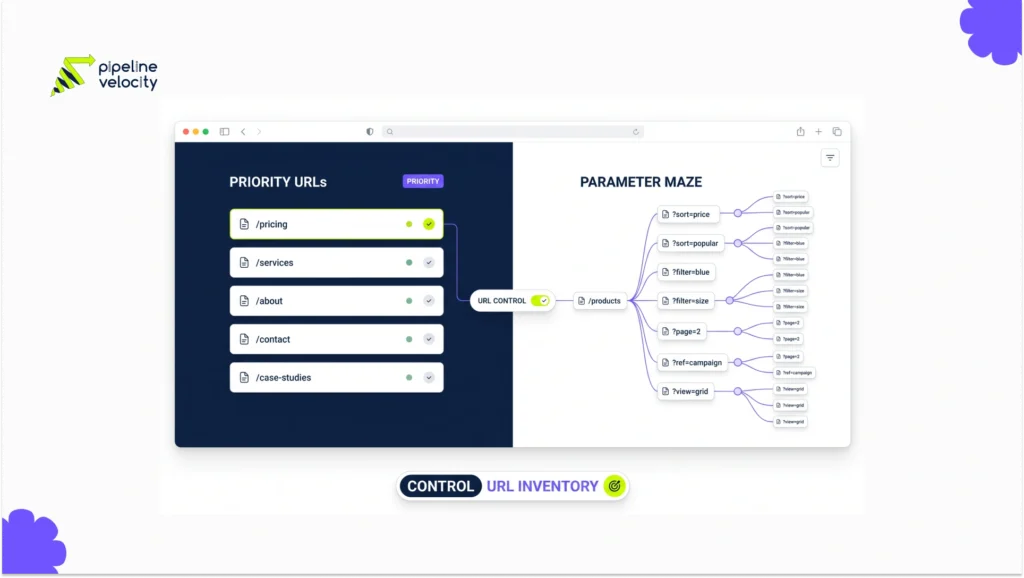
Common sources of excessive inventory include faceted filters with combinatorial URLs, sort and tracking parameters, session IDs, internal search results, calendars with endless future dates, print variants, malformed relative links and duplicate HTTP, HTTPS, host or trailing-slash versions.
Other waste comes from stale URLs returning soft 404 responses, long redirect chains, duplicate feeds, expired product pages that remain linked and JavaScript applications that generate crawlable states unintentionally.
Group log requests by URL pattern and compare each group with its organic purpose. A pattern with high requests, no valid indexable destination and no user value is a stronger candidate than an individual odd URL. If JavaScript generates links or content states, review Google’s JavaScript SEO documentation to understand how crawling, rendering and indexing interact.
Which Controls Should You Use?
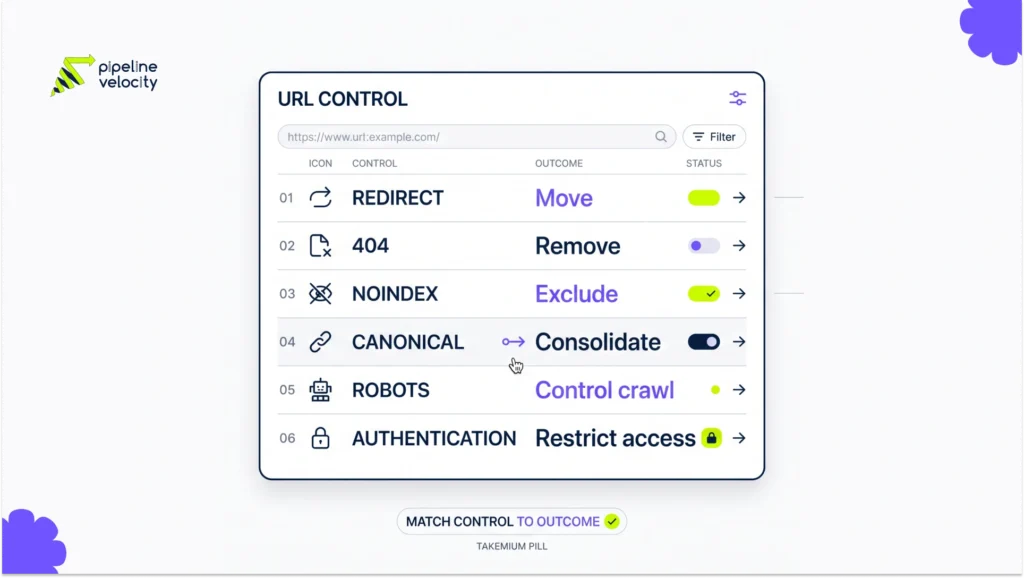
Choose a control based on the desired end state.
| Desired result | Primary control | Important caution |
| Remove a moved URL | Server-side redirect | Point directly to the final relevant destination |
| Remove a deleted URL | 404 or 410 status | Do not return a soft 404 with a success status |
| Keep accessible but out of results | noindex | Google must crawl the URL to see the directive |
| Consolidate duplicates | Redirect or canonical signal | A canonical is a signal, not a crawl block |
| Prevent crawling of a pattern | robots.txt | Blocked URLs can still be known or appear without a snippet |
| Restrict private content | Authentication | robots.txt is not access control |
Google’s robots.txt guide says the file primarily manages crawler traffic and is not a mechanism for reliably keeping a page out of search results. Its noindex documentation also warns that a blocked page cannot be crawled to reveal its noindex rule.
Sequence matters. If a parameter family is indexed and must disappear, Google may need temporary access to see a redirect, canonical or noindex before you block crawling. Test the exact lifecycle with an SEO lead and developer.
How Do You Fix Faceted Navigation and Parameters?
First define which filter combinations deserve standalone search pages. Usually those are durable categories with differentiated demand, useful content and sufficient inventory. All other combinations should avoid creating an unlimited crawl path.
Control the source by changing internal links, URL generation and application logic. Do not rely only on canonical tags while navigation keeps producing millions of alternatives. Google’s URL structure guidance recommends clear, consistent parameter formats and cautions against temporary parameters in internal links.
For each parameter, document whether it changes content, only sorts, tracks a session, changes presentation or creates a valuable landing page. Decide its canonical target, indexability, crawl access and internal-link behavior. Then test single and combined parameters because interactions create the largest traps.
How Do Sitemaps and Internal Links Improve Discovery?
An XML sitemap should list canonical URLs that you want in search. Remove redirects, duplicates, errors and noindex URLs. Use accurate last-modified values only when the primary content changes. Split large sitemaps into meaningful groups so coverage can be diagnosed.
Google’s sitemap guidance calls submission a hint, not a guarantee. A clean sitemap supports discovery, but it does not repair contradictory canonicals, weak content or blocked access.
Important pages also need crawlable HTML links from relevant hubs. Reduce unnecessary depth and avoid orphan pages. Pipeline Velocity’s guide to increasing website visibility places technical access inside the broader work of building pages search engines and users can find and understand.
What Should You Measure?
Create a before-and-after view by URL group. Measure verified Googlebot requests, response codes, host availability, median response time, bytes transferred, requests to low-value patterns and requests to priority URLs. Pair that with discovery time, recrawl time, indexed canonical pages and organic outcomes.
Do not celebrate fewer crawls in isolation. A robots.txt change can cut request volume while accidentally blocking useful resources or important pages. The goal is better coverage and freshness for valuable URLs with stable infrastructure, not the smallest possible crawl count.
What Is a Safe 30-Day Plan?
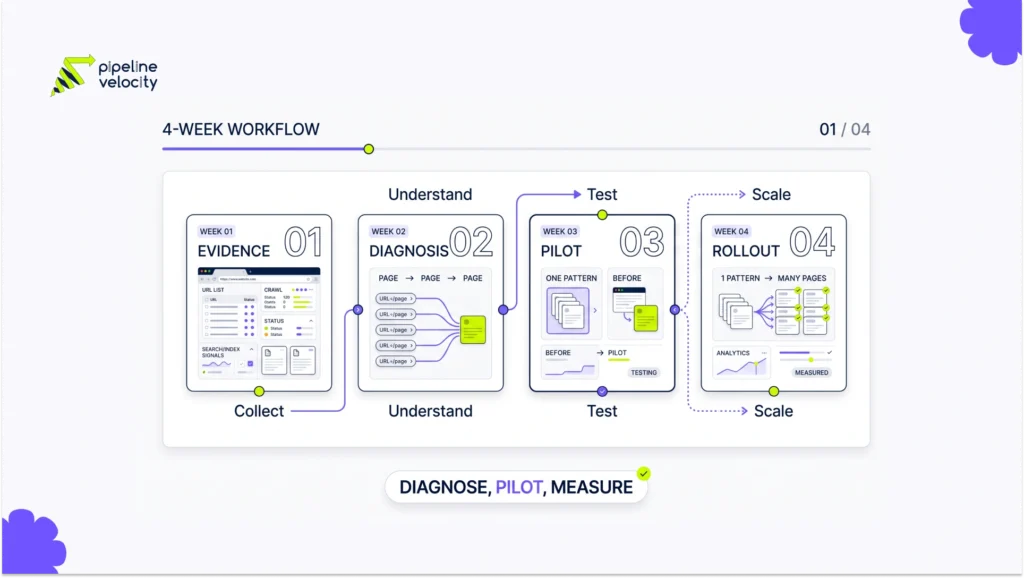
In week one, collect logs, Crawl Stats, index reports, sitemaps and a crawler export. Verify Googlebot where raw logs are used. Group URLs by template and parameter pattern.
In week two, rank patterns by request volume, business value and implementation risk. Define the desired index and crawl state for each group. Choose one bounded pattern for a pilot.
In week three, implement the source fix plus the appropriate status, canonical, noindex or robots rule. Test production-like samples, critical paths and edge cases. Record a rollback condition.
In week four, monitor logs, Search Console and priority URL groups. Expand only after the pilot shows the intended state without harming discovery, rendering or indexation.
For a prioritized technical roadmap, Pipeline Velocity’s SEO service connects crawl evidence with page value and implementation effort.
FAQs About Crawl Budget Optimization
Is Crawl Budget a Google Ranking Factor?
No. Crawl management can help important content get discovered or refreshed, but it does not make weak pages rank merely because Googlebot visits them.
How Do I Check My Crawl Budget?
Use Search Console Crawl Stats for aggregate behavior and verified server logs for URL-level requests. Compare them with inventory and indexing data.
Does Robots.txt Save Crawl Budget?
It can prevent requests to allowed patterns, but it may be the wrong control for removal or consolidation. Blocked URLs can remain known, and Google cannot see a noindex on a blocked page.
Does Noindex Stop Googlebot From Crawling?
Not immediately. Google must crawl a URL to discover the noindex directive and may revisit it later to check whether the directive changed.
Do Canonical Tags Prevent Crawling?
No. Canonicals signal the preferred representative among duplicate pages. Google may still crawl alternatives to evaluate those signals.
Should Small Websites Optimize Crawl Budget?
Usually not as a separate project. Small sites should first fix broken access, accidental noindex, weak internal linking, duplicate architecture and low-value content.
Can Faster Servers Increase Googlebot Crawling?
Better availability can remove a capacity constraint, but Google still decides crawl demand. More capacity does not guarantee more useful crawling.
How Long Does Crawl Budget Optimization Take to Show Results?
Technical request patterns may change quickly, while discovery and indexation effects can take longer. Measure by URL group over several crawl cycles.
Conclusion
Crawl budget optimization begins with inventory control, not a robots.txt patch. Prove the constraint, identify waste by URL pattern, choose the correct control, pilot safely and measure whether valuable pages are discovered and refreshed more reliably.