


A successful crawl proves that Googlebot fetched a URL. It does not prove that Google rendered the page, saw the main content, discovered its links or indexed the intended metadata. JavaScript SEO fails in the gap between fetched HTML and rendered output. Diagnose that gap by comparing the server response, rendered DOM and indexed result for the same URL.
Key Takeaways
- Google queues crawling and rendering separately, so a fetched page can still wait for rendering.
- Essential copy, links, canonicals and structured data are safer in server-rendered HTML.
- Blocked scripts, API failures, consent walls and user-only interactions can remove content from Google’s rendered view.
- Test one URL across raw HTML, rendered HTML, console errors, loaded resources and Search Console.
- Use real anchor elements with href values for links that crawlers must follow.
- Dynamic rendering is a workaround that Google does not recommend as a long-term solution.
How Can Google Crawl a Page but Miss Its Content?
Crawling retrieves resources, while rendering executes the page and builds a DOM. Google’s JavaScript SEO basics explain that Googlebot queues pages for both crawling and rendering. Those events are not necessarily immediate.
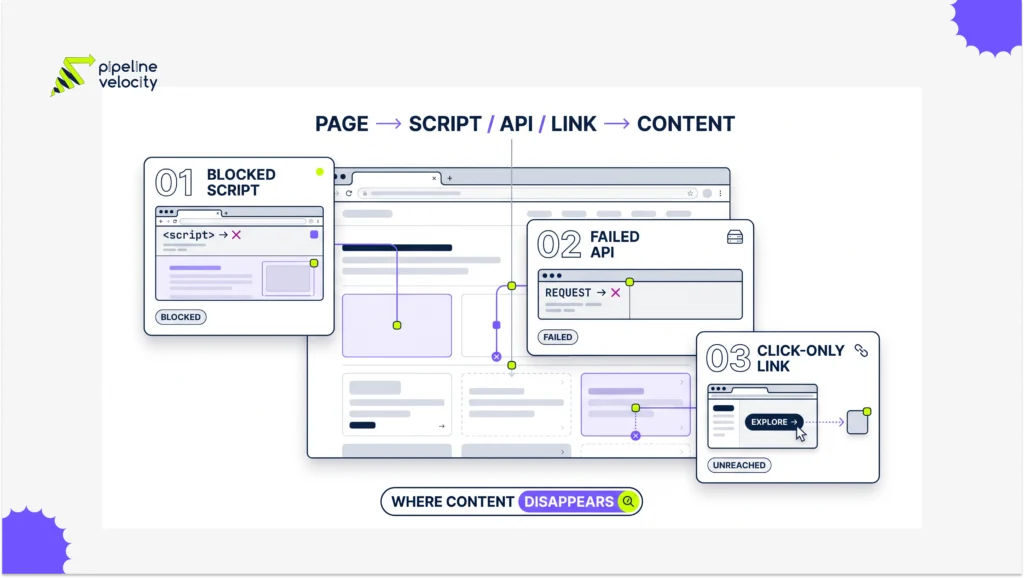
A client-rendered application may return a small HTML shell with no product copy, category links or canonical tag. The browser then requests scripts and APIs to create the page. If those resources are blocked, slow, erroring or dependent on user state, Google can fetch the URL but receive an incomplete rendered result.
Pipeline Velocity’s SEO service can connect this rendering diagnosis with indexation, internal linking and page-quality work.
Which JavaScript SEO Failures Matter Most?
Prioritize failures that remove meaning or discovery paths. A cosmetic animation error rarely matters. Missing product descriptions, links or robots directives can change whether a page is indexed at all.
| Failure | What Google May See | Business Effect |
| Empty app shell | Title and little body content | Weak understanding or exclusion |
| Blocked script or API | Partial template | Missing products, services or reviews |
| Click-only navigation | No crawlable href links | Deep pages remain undiscovered |
| Late metadata rewrite | Conflicting title, canonical or robots | Wrong indexing signals |
| Lazy load tied to scroll | Missing images or copy | Incomplete page representation |
| Soft error in the app | 200 response with error message | Low-quality indexed URL |
Google’s guide to fixing search-related JavaScript problems recommends checking rendered HTML, loaded resources, console output and exceptions.
How Do You Test Raw and Rendered HTML?
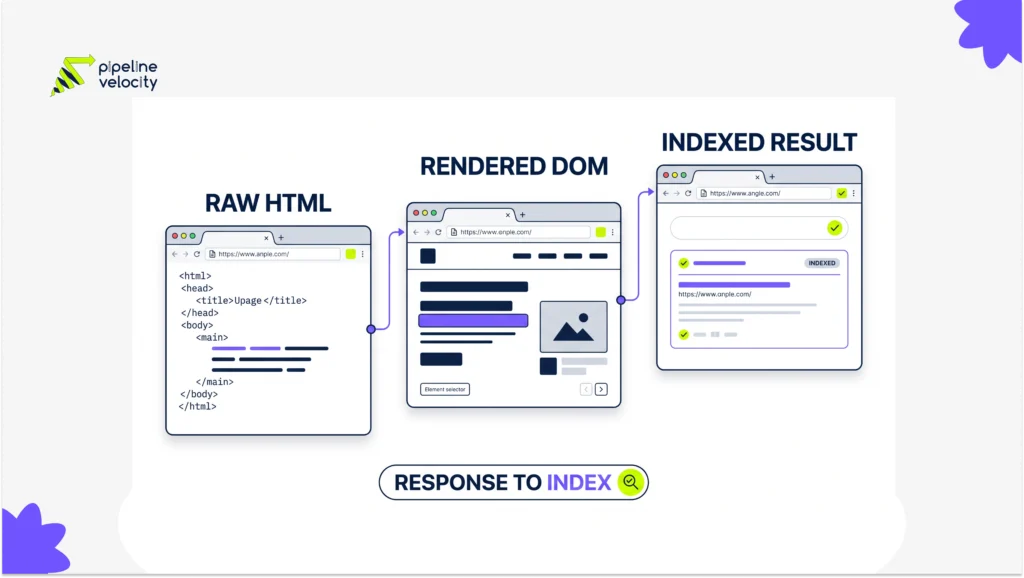
Compare evidence at three stages: response, render and index. Start with the HTML returned without executing JavaScript. Then inspect the DOM after rendering. Finally, use URL Inspection to see Google’s available crawl and rendering information.
Check whether each stage contains:
- Unique title and meta description
- Canonical and robots directives
- Main heading and primary copy
- Crawlable internal links
- Image and video source URLs
- Structured data that matches visible content
- A meaningful status when data is unavailable
Do not rely on analytics to prove Googlebot executed the page. Google notes that client-side analytics may not fully represent Web Rendering Service activity. Pair Search Console with server logs and a JavaScript-capable crawler.
The website visibility guide explains how technical access and internal discovery support broader organic visibility.
Which Rendering Strategy Should You Choose?
Render essential public content before or during the server response when possible. Static generation and server-side rendering reduce dependence on a second rendering step. Hydration can then add interaction without withholding the page’s meaning.
Client-side rendering can work when the application is small, resources are reliable and important content appears consistently after execution. It creates more failure points, so test templates under slow networks, missing APIs and logged-out conditions.
Google describes dynamic rendering as a workaround rather than a recommended solution. It adds a bot-specific rendering path that can drift from the user experience. Use it only as a temporary bridge while moving important content to a stable rendering model.
How Should Links, Metadata and Structured Data Work?
Put search controls in predictable HTML and make navigation crawlable. Google’s link best practices recommend anchor elements with href values. Buttons that only call JavaScript do not provide the same discovery path.
Keep the initial and rendered canonical consistent. Do not ship one canonical in HTML and replace it with another after execution. Generate structured data from the same source as the visible page, and ensure it appears in the rendered DOM.
For lazy-loaded media, Google’s lazy-loading guidance recommends using URL Inspection to confirm that rendered HTML contains the expected source URLs.
Pipeline Velocity’s guide to optimizing a website for ChatGPT adds a related point: content that depends on client execution may also be less accessible to non-Google retrieval systems.
What Should a JavaScript SEO QA Process Include?
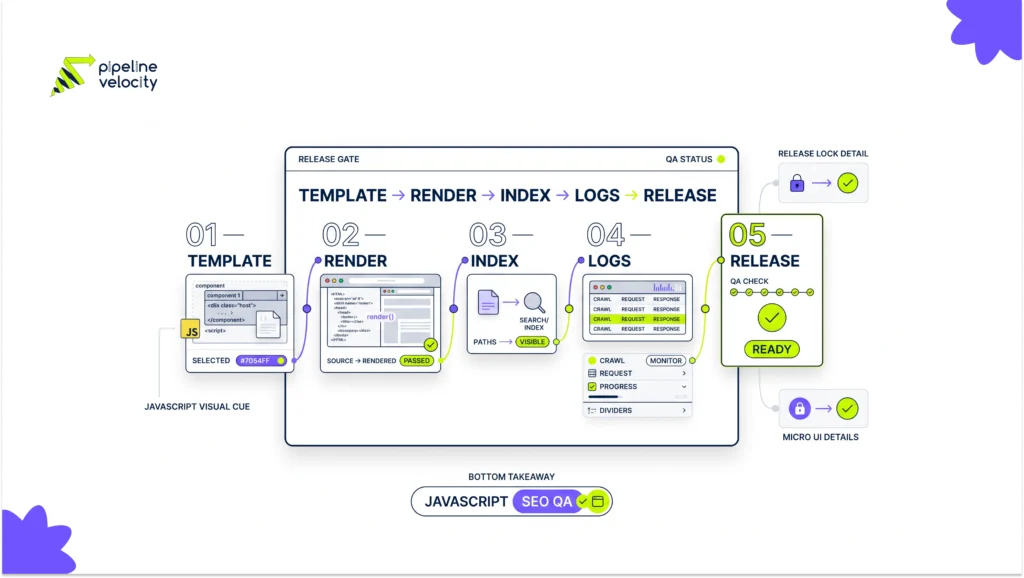
Test representative templates before release and monitor them after deployment. One passing homepage does not prove that product, category, search and location templates render correctly.
Create a release gate with these checks:
- Raw and rendered content parity for essential fields
- Crawlable links to every indexable template
- No blocked essential scripts or APIs
- Stable canonical, robots and hreflang values
- Valid structured data after rendering
- Meaningful HTTP status and error states
- Search Console inspection for sample URLs
- Server-log monitoring for repeated resource failures
The Brave Search ranking guide shows why clean crawlability and server-visible content matter across a wider set of search and answer engines.
FAQs About JavaScript SEO
Can Google Index JavaScript Content?
Yes, Google can render JavaScript, but rendering has limits and can be delayed or fail. Essential content should not depend on fragile client-side conditions.
Is Server-Side Rendering Required for SEO?
No, but it reduces the number of steps required to expose important content. Choose the simplest rendering model that reliably serves users and crawlers.
How Do I See What Google Rendered?
Use URL Inspection or the Rich Results Test for representative URLs. Review rendered HTML, screenshots where available, loaded resources and console errors.
Can Robots.txt Block JavaScript Files?
It can, but blocking essential scripts can prevent Google from understanding the page. Allow resources required to render public indexable content.
Are JavaScript-Generated Links Crawlable?
They can be when rendered as real anchor elements with href values. Click handlers without crawlable URLs are poor discovery paths.
Should I Use Dynamic Rendering?
Treat it as a temporary workaround, not the preferred architecture. Google recommends server-side rendering, static rendering or hydration instead.
Conclusion
Take one high-value template and compare its raw HTML, rendered DOM and indexed result. Fix missing content and links first, then stabilize metadata, structured data and error handling. Repeat the test across templates and add it to release QA.
For a rendering and indexation diagnosis tied to commercial pages, request a technical review through Pipeline Velocity’s SEO service.